Object Orientation
Object Orientation (OO) is a programming paradigm that organizes software into objects that contain both data (properties) and behavior (methods). It helps developers write reusable, secure, and maintainable programs.
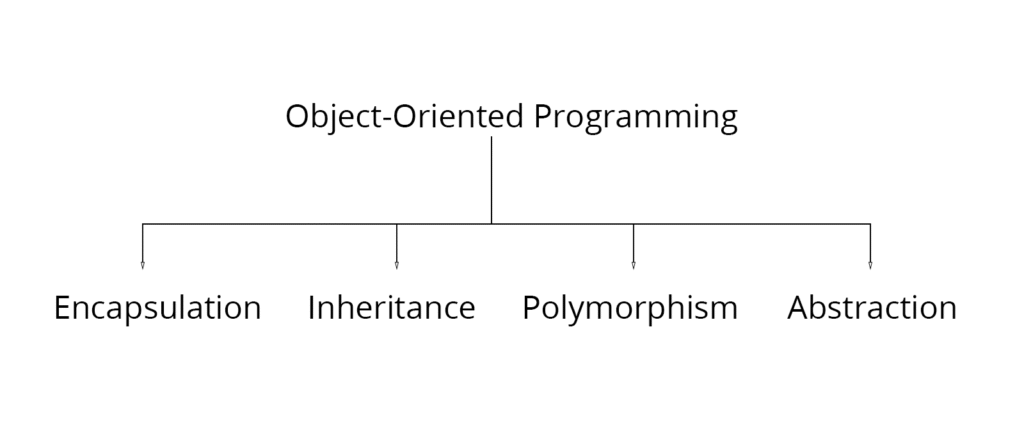
Object-oriented programming (OOP) is the foundation of C#. Instead of writing long procedural code, programs are divided into objects that interact with each other. C# supports the four pillars of OOP:
- Encapsulation
- Inheritance
- Polymorphism
- Abstraction
OOP Pillars
Encapsulation
- Bundles data and methods into a single class.
- Protects data from unauthorized access.
Example
class Student
{
public string Name;
public void Display()
{
Console.WriteLine(Name);
}
}
Real-World Scenario (Nepal)
A Khalti wallet stores a user’s balance privately. Users can access or modify it only through authorized functions like Load Money or Pay, not by directly changing the balance.
Diagram

Inheritance
Allows one class to acquire the properties and methods of another class.
Example
Vehicle
|
Car
A Car automatically gets common features from Vehicle.
Real-World Scenario (Nepal)
A Government Employee class can be inherited by Teacher, Police Officer, and Doctor, since all are government employees but have additional responsibilities.
Polymorphism
Allows one method to perform different tasks depending on the object.
Example
Draw()
Circle → Draw Circle
Rectangle → Draw Rectangle
Triangle → Draw Triangle
Abstraction
Shows only essential information while hiding implementation details.
Example
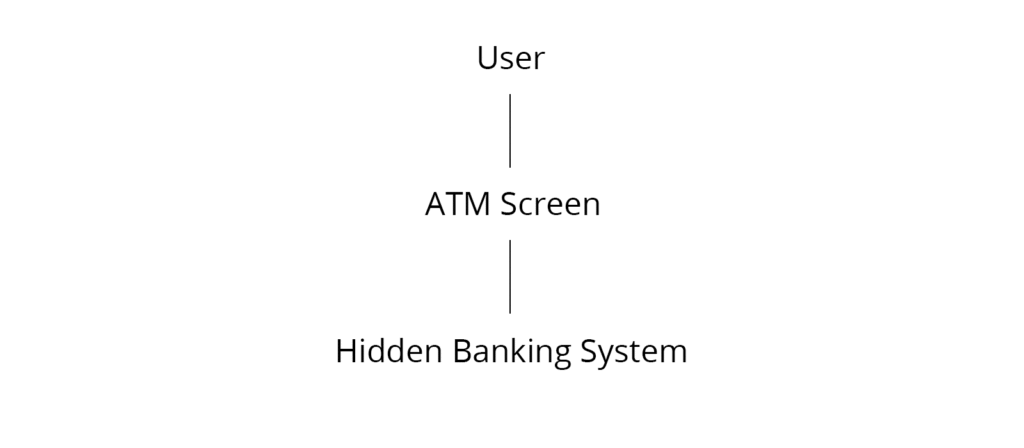
While using an ATM, users press buttons to withdraw money without knowing how the banking system processes the transaction.
Real-World Scenario (Nepal)
Using the eSewa mobile app. Users simply tap Pay Electricity Bill, while the application hides all backend processing.
Diagram

Advantages of OOP
- Reusability
- Easy maintenance
- Better security
- Modular programming
- Reduced development time
- Easy debugging
- Scalability
Key Points for Exam
- OOP is the foundation of C# programming.
- Four pillars: Encapsulation, Inheritance, Polymorphism, and Abstraction.
- Objects contain both data and methods.
- OOP improves code reuse, security, and maintainability.
Type Safety
Type Safety is the feature of C# that prevents a variable from storing a value of an incompatible data type, reducing programming errors and improving program reliability.
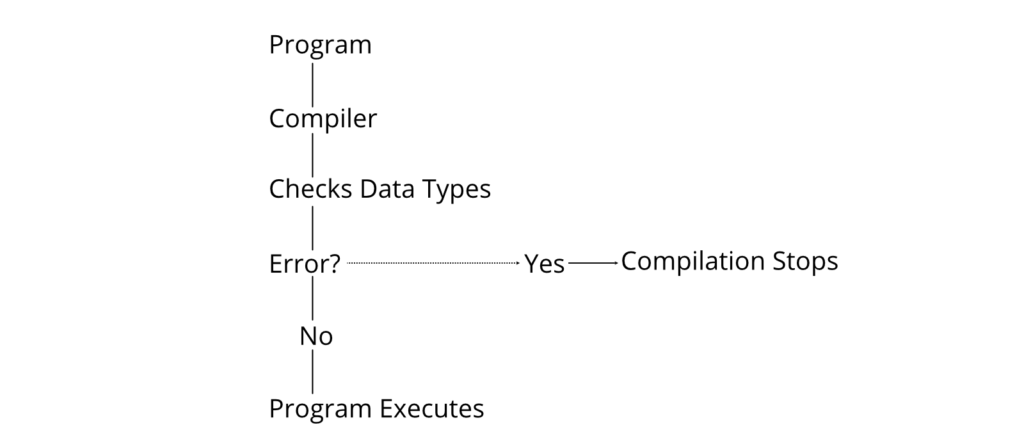
C# is a strongly typed language. Every variable must have a declared data type, and the compiler checks type compatibility before execution.
Example
int age = 20;
string name = “Ram”;
Correct because the assigned values match the declared data types.
Invalid example:
int age = “Twenty”;
This produces a compile-time error because a string cannot be assigned to an integer.
Benefits of Type Safety
- Detects errors during compilation.
- Prevents invalid memory access.
- Improves program reliability.
- Makes debugging easier.
- Enhances application security.
Compile-Time Type Checking

Real-World Scenario (Nepal)
In the National Identity Card Registration System, the Age field accepts only numeric values. If someone enters “Twenty” instead of 20, the system rejects the input before saving the record. This is similar to type safety in C#.
Key Points for Exam
- C# is a strongly typed language.
- Type safety prevents invalid assignments.
- Most type errors are detected during compilation.
- It increases software security and reliability.
Memory Management
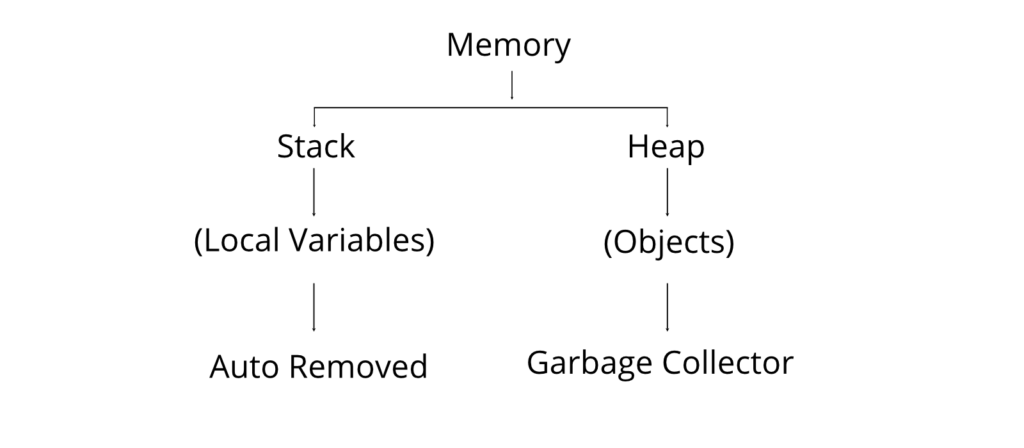
Memory Management is the process of allocating and releasing memory automatically so that programs use system resources efficiently.
Unlike languages such as C++, C# automatically manages memory through the Garbage Collector (GC). Programmers generally do not need to free memory manually.
Types of Memory
Stack Memory
- Stores local variables.
- Fast memory allocation.
- Automatically released when a method ends.
Heap Memory
- Stores objects created using the new keyword.
- Managed by the Garbage Collector.
- Slower than stack memory.
Diagram

Garbage Collection (GC)
The Garbage Collector (GC) is a component of the CLR that automatically removes objects that are no longer used by the program, freeing heap memory.
Working Process

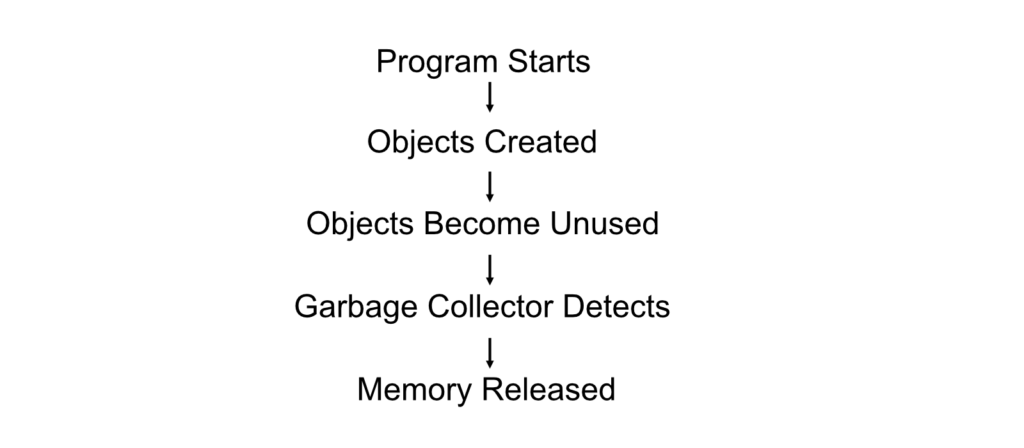
Example
Student s = new Student();
When s is no longer referenced, the Garbage Collector eventually removes the object from memory.
Advantages of Automatic Memory Management
- Prevents memory leaks.
- Reduces programming errors.
- Improves application performance.
- Simplifies development.
- Eliminates manual memory deallocation.
Real-World Scenario (Nepal)
Consider a TU Online Admission Portal. Thousands of student records are processed every day. Once a request is completed, the temporary objects used for processing are automatically removed from memory by the Garbage Collector, allowing the server to continue handling new requests efficiently.
Difference Between Stack and Heap
| Stack | Heap |
| Stores local variables | Stores objects |
| Faster | Comparatively slower |
| Automatically released after method execution | Released by Garbage Collector |
| Small memory | Large memory |
| LIFO structure | Dynamic memory allocation |
Key Points for Exam
- Memory management is automatic in C#.
- Stack stores local variables; Heap stores objects.
- Garbage Collector automatically frees unused heap memory.
- Automatic memory management improves performance and prevents memory leaks.
Platform Support
Platform Support is the capability of C# and the .NET Framework to develop and execute applications on different operating systems and hardware platforms with minimal code changes.
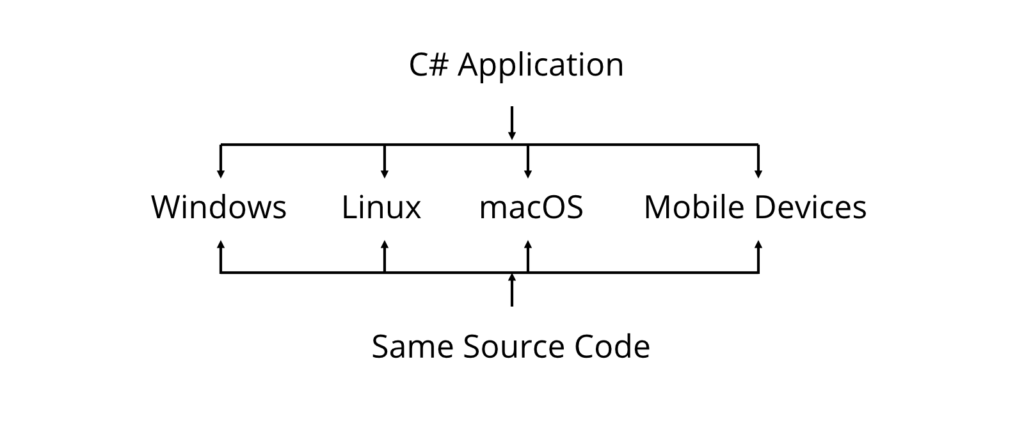
Initially, the .NET Framework was designed for Windows. With the introduction of .NET Core and later .NET (5/6/7/8), C# applications became cross-platform and can run on Windows, Linux, and macOS.
Types of Platform Support
- Windows
- Supports Windows Forms, WPF, ASP.NET, Console Applications, and Services.
- Linux
- Supports Console Applications, ASP.NET Core, Cloud Applications, and Microservices.
- macOS
- Supports Desktop, Console, and Web Applications using .NET.
- Mobile Platforms
- Android and iOS applications can be developed using .NET MAUI or Xamarin.
- Cloud Platforms
- Applications can be deployed on Microsoft Azure, AWS, and Google Cloud Platform.
Example
A developer creates an ASP.NET Core web application on Windows. The same application can be hosted on a Linux server without changing its source code.
Real-World Scenario (Nepal)
A software company in Kathmandu develops an online college management system using ASP.NET Core on Windows laptops. The system is later deployed to a Linux cloud server, allowing students and teachers across Nepal to access it through a web browser.
Diagram

Advantages of Platform Support
- Code reusability across multiple operating systems.
- Lower development and maintenance cost.
- Easier deployment on cloud platforms.
- Supports modern application development.
Key Points for Exam
- Platform support enables applications to run on multiple operating systems.
- Modern .NET is cross-platform.
- ASP.NET Core is commonly used for cross-platform web development.
C# and CLR
Common Language Runtime (CLR) is the execution engine of the .NET Framework that manages the execution of C# programs by providing services such as memory management, security, exception handling, and garbage collection.
When a C# program is compiled, it is not converted directly into machine code. Instead, it is converted into Intermediate Language (IL). The CLR then uses the Just-In-Time (JIT) Compiler to convert IL into machine code during execution.
Program Execution Process

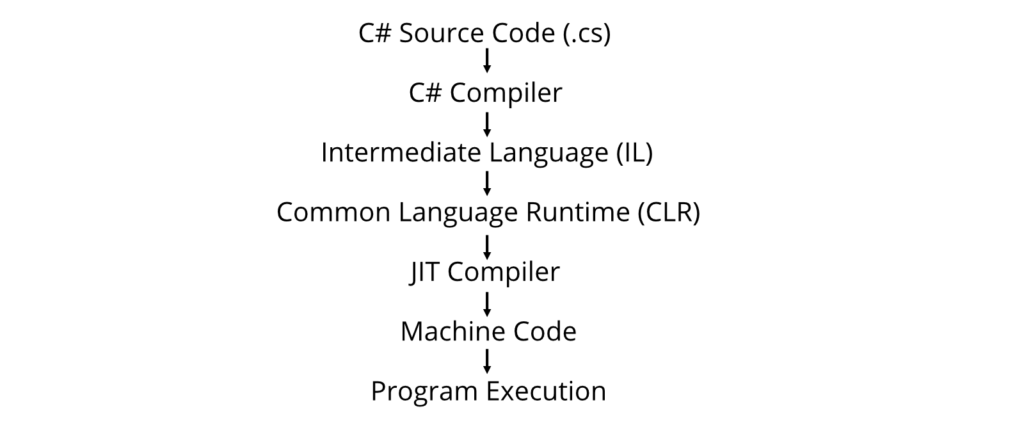
Responsibilities of CLR
Memory Management
- Allocates memory for objects.
- Removes unused objects using Garbage Collection.
Garbage Collection
- Automatically frees memory occupied by unused objects.
Exception Handling
- Detects and handles runtime errors.
Security
- Verifies code before execution.
- Prevents unauthorized access.
Thread Management
- Supports execution of multiple threads simultaneously.
Language Interoperability
- Allows different .NET languages (C#, VB.NET, F#) to interact.
Example
using System;
class Program
{
static void Main()
{
Console.WriteLine(“Hello, .NET”);
}
}
Execution Steps:
- C# compiler converts the code into IL.
- CLR loads the IL.
- JIT Compiler converts IL into machine code.
- The program executes.
Real-World Scenario (Nepal)
A banking application developed in C# by a financial institution in Nepal relies on the CLR to manage memory, protect sensitive customer data, and recover gracefully from runtime exceptions, ensuring reliable transactions.
Diagram

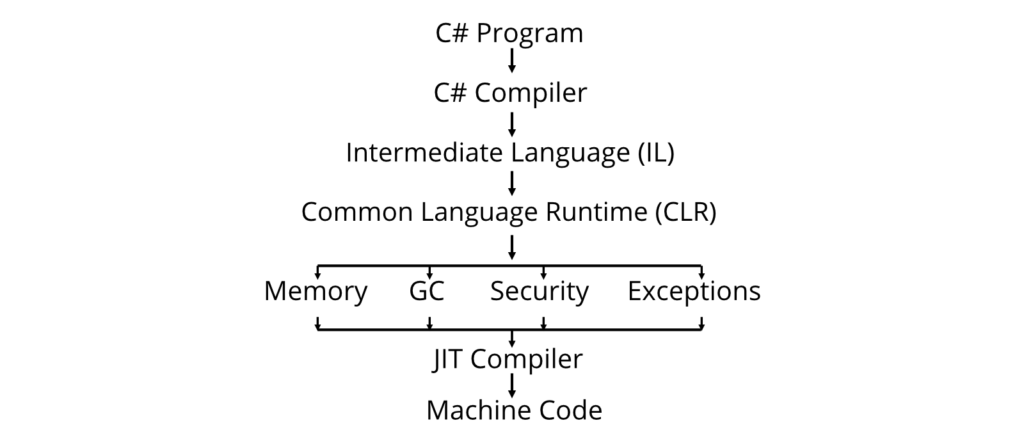
Advantages of CLR
- Automatic memory management.
- Platform independence through IL.
- Improved security.
- Better performance using JIT compilation.
- Simplified exception handling.
Key Points for Exam
- CLR is the execution engine of .NET.
- C# code is first compiled into Intermediate Language (IL).
- JIT Compiler converts IL into machine code.
- CLR provides Garbage Collection, security, exception handling, and memory management.
CLR and .NET Framework
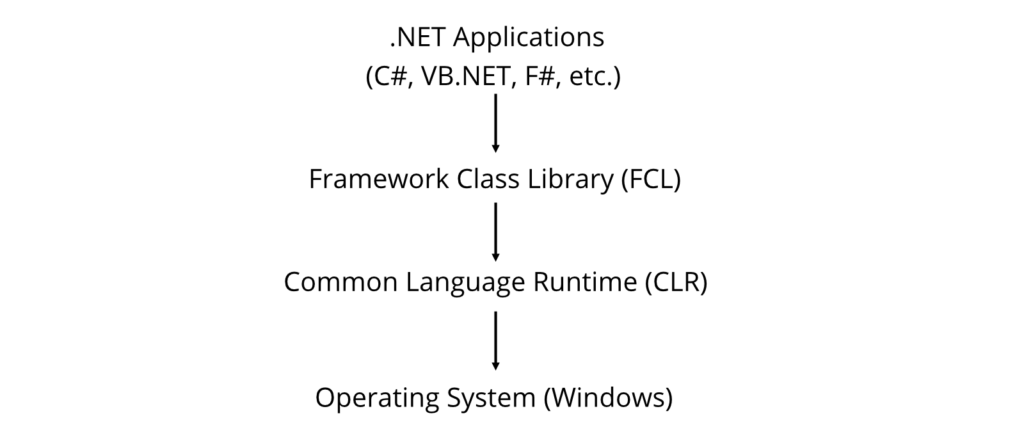
.NET Framework is a software development platform provided by Microsoft, while the Common Language Runtime (CLR) is its execution engine responsible for running .NET applications.
The .NET Framework provides libraries and APIs for application development, whereas the CLR executes the compiled code and manages runtime services.
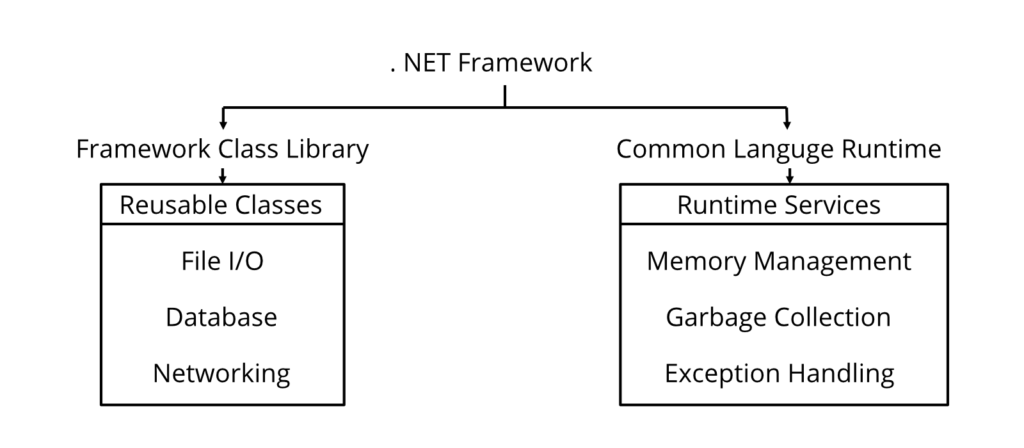
Components of the .NET Framework
Common Language Runtime (CLR)
- Executes .NET applications.
- Manages memory and exceptions.
- Performs JIT compilation.
Framework Class Library (FCL)
- A collection of reusable classes.
- Provides functionality for file handling, networking, collections, databases, security, and web development.
Languages Supported
- C#
- VB.NET
- F#
- Managed C++
Architecture of .NET Framework

CLR vs .NET Framework
| CLR | .NET Framework |
| Runtime environment | Software development platform |
| Executes programs | Provides libraries and runtime |
| Performs JIT compilation | Contains CLR and FCL |
| Handles memory management | Used to build applications |
| Performs Garbage Collection | Supports multiple programming languages |
Framework Class Library (FCL)
The Framework Class Library (FCL) is a collection of predefined classes and namespaces that simplify software development.
Common Namespaces
| Namespace | Purpose |
| System | Basic classes |
| System.IO | File handling |
| System.Collections | Collections |
| System.Net | Networking |
| System.Data | Database programming |
| System.Web | Web applications |
Example
using System;
class Program
{
static void Main()
{
DateTime today = DateTime.Now;
Console.WriteLine(today);
}
}
Here, the System namespace and DateTime class are provided by the Framework Class Library.
Real-World Scenario (Nepal)
A university develops an online examination system using the .NET Framework. The application uses:
- System.Data for database operations.
- System.IO for report generation.
- CLR for runtime execution and memory management.
Diagram

Advantages of the .NET Framework
- Rich library support.
- Easy application development.
- High security.
- Automatic memory management.
- Language interoperability.
- Improved developer productivity.
Key Points for Exam
- The .NET Framework consists mainly of the CLR and the Framework Class Library (FCL).
- CLR executes programs and manages runtime services.
- FCL provides reusable classes and namespaces.
- C#, VB.NET, and F# can all run on the same CLR.
Other Frameworks
Other Frameworks are Microsoft and third-party .NET implementations that allow developers to build applications for different platforms such as desktop, web, cloud, and mobile devices.
Besides the traditional .NET Framework, Microsoft introduced several frameworks to overcome platform limitations and improve performance.
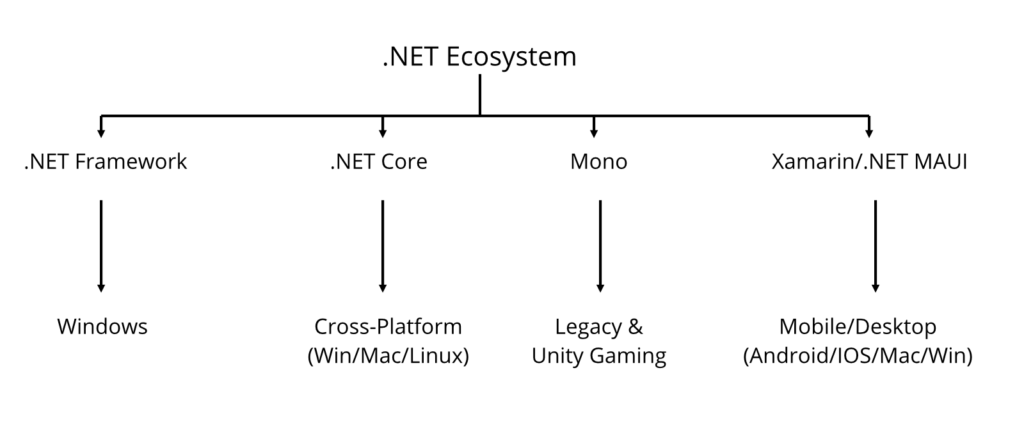
.NET Core
.NET Core is an open-source, cross-platform framework developed by Microsoft for building modern applications.
Unlike the traditional .NET Framework, .NET Core supports Windows, Linux, and macOS.
Features
- Cross-platform
- Open-source
- High performance
/Max - Cloud-ready
- Supports microservices
- Command Line Interface (CLI)
Example
A developer creates an ASP.NET Core website on Windows and deploys it to a Linux server without modifying the source code.
Real-World Scenario (Nepal)
A startup in Kathmandu develops an online food delivery system using ASP.NET Core and hosts it on a Linux cloud server, reducing hosting costs while maintaining performance.
Mono
Mono is an open-source implementation of the .NET Framework that enables .NET applications to run on non-Windows platforms.
Mono was widely used before the release of .NET Core and is still used in some legacy applications.
Features
- Cross-platform
- Open-source
- Supports Linux and macOS
- Supports game development through Unity
Example
Unity game developers often use Mono to execute C# scripts during development.
Real-World Scenario (Nepal)
A game development company in Nepal uses Unity with Mono to build educational games for schools.
Xamarin
Xamarin is a Microsoft framework used to develop Android and iOS applications using C#.
Developers write one codebase that can be shared across multiple mobile platforms.
Features
- Cross-platform mobile development
- Native performance
- Shared business logic
- Visual Studio integration
Example
One C# application can run on both Android and iPhone.
Real-World Scenario (Nepal)
A hospital develops a mobile appointment system using Xamarin, allowing both Android and iPhone users to book appointments.
.NET MAUI
.NET Multi-platform App UI (MAUI) is the successor to Xamarin used for developing desktop and mobile applications from a single codebase.
Supported Platforms
- Windows
- Android
- iOS
- macOS
Diagram

Key Points for Exam
- .NET Core is cross-platform and open-source.
- Mono allows .NET applications to run on Linux and macOS.
- Xamarin develops mobile applications.
- .NET MAUI is the modern replacement for Xamarin.
Framework Overview
Framework Overview refers to the overall architecture and components of the .NET Framework that work together to develop and execute applications efficiently.
The .NET Framework provides a complete environment for software development by combining runtime services with reusable libraries.
Main Components
1. Common Language Runtime (CLR)
Responsible for:
- Program execution
- Memory management
- Security
- Garbage Collection
- Exception handling
2. Framework Class Library (FCL)
Provides reusable classes for:
- File handling
- Networking
- Database connectivity
- XML processing
- Collections
- Security
3. Languages
Applications can be written using:
- C#
- VB.NET
- F#
- Managed C++
4. Applications
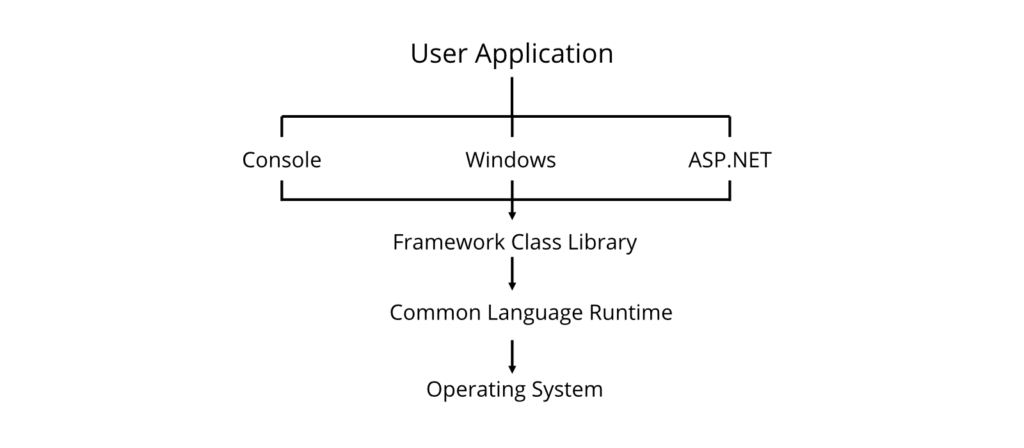
Using .NET, developers can build:
- Console Applications
- Windows Applications
- Web Applications
- Mobile Applications
- Cloud Applications
- APIs
Overall Architecture

Real-World Scenario (Nepal)
A university management system uses:
- C# language
- Framework Class Library
- SQL Server database
- CLR for execution
All these components work together to manage admissions, examinations, and result processing.
Key Points for Exam
- The .NET Framework consists mainly of CLR and FCL.
- Supports multiple programming languages.
- Provides reusable libraries for rapid development.
- Supports desktop, web, mobile, and cloud applications.
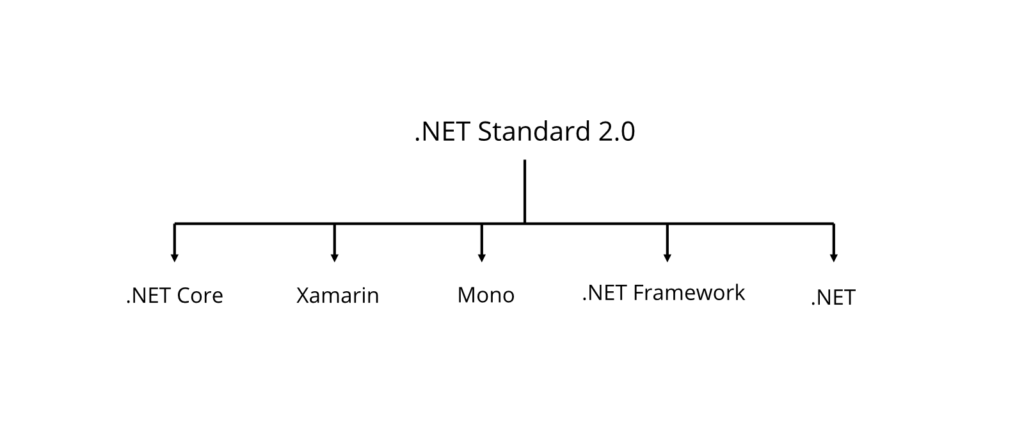
.NET Standard 2.0
.NET Standard 2.0 is a specification that defines a common set of APIs that all .NET implementations must support, ensuring code compatibility across different .NET platforms.
It is not a runtime or framework. Instead, it acts as a contract that allows developers to create reusable libraries.
Purpose
- Improves code sharing
- Increases compatibility
- Simplifies library development
- Reduces duplicate code
Supported Platforms
- .NET Framework
- .NET Core
- Xamarin
- Mono
- .NET 5+
- .NET MAUI
Diagram

Example
A class library developed using .NET Standard can be used by:
- Desktop applications
- Mobile applications
- Web applications
without changing the source code.
Real-World Scenario (Nepal)
A software company develops a Student Library Management Library using .NET Standard. The same library is reused in desktop software, mobile applications, and web portals for multiple colleges.
Advantages
- Platform independence
- Code reusability
- Easy maintenance
- Improved compatibility
Key Points for Exam
- .NET Standard defines APIs, not a runtime.
- Enables sharing libraries across different .NET platforms.
- Improves portability and maintainability.
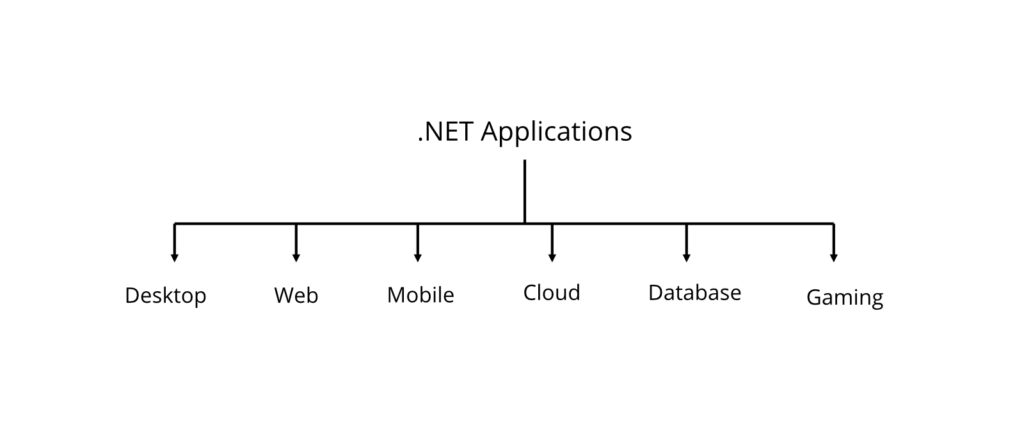
Applied Technologies
Applied Technologies are real-world technologies and application areas where C# and the .NET platform are used to develop software solutions.
Desktop Applications
Developed using:
- Windows Forms
- WPF
Examples
- Billing System
- Payroll System
- Inventory Management
Web Applications
Developed using:
- ASP.NET
- ASP.NET Core
Examples
- E-commerce websites
- Online examination systems
- College management systems
Mobile Applications
Developed using:
- Xamarin
- .NET MAUI
Examples
- Banking apps
- Hospital management apps
- Food delivery apps
Cloud Applications
Developed using:
- Microsoft Azure
- ASP.NET Core
Examples include:
- Online storage
- Cloud APIs
- SaaS applications
Database Applications
Developed using:
- ADO.NET
- Entity Framework
Examples:
- Banking systems
- Student Information Systems
- Hospital Management Systems
Game Development
Developed using:
- Unity Game Engine
- C#
Examples:
- Educational games
- Simulation games
- 2D and 3D games
Internet of Things (IoT)
Developed using:
- .NET IoT Libraries
Examples:
- Smart home automation
- Smart agriculture
- Weather monitoring
Diagram

Real-World Scenario (Nepal)
Many organizations in Nepal use .NET technologies:
| Organization | Possible Application |
| Banks | Internet Banking System |
| Hospitals | Patient Management |
| Colleges | Student Management |
| Government Offices | Citizen Information Systems |
| E-commerce Companies | Online Shopping Platforms |
Advantages of .NET Technologies
- High security
- Fast development
- Cross-platform support
- Rich Framework Class Library
- Excellent database connectivity
- Large developer community
Key Points for Exam
- .NET is widely used for desktop, web, mobile, cloud, gaming, and database applications.
- ASP.NET is used for web development.
- ADO.NET and Entity Framework are used for database connectivity.
- Unity uses C# for game development.
Important Terms to Remember
- Object-Oriented Programming (OOP)
- Type Safety
- Memory Management
- Stack Memory
- Heap Memory
- Garbage Collector (GC)
- Common Language Runtime (CLR)
- Intermediate Language (IL)
- Just-In-Time (JIT) Compiler
- Framework Class Library (FCL)
- .NET Framework
- .NET Core
- Mono
- Xamarin
- .NET MAUI
- .NET Standard 2.0
- ASP.NET
- ADO.NET
Frequently Asked TU Examination Questions
Short Questions (5 Marks)
- Define Object-Oriented Programming. Explain its four pillars.
- What is Type Safety in C#?
- Differentiate between Stack and Heap memory.
- Explain the role of the Garbage Collector.
- What is CLR? Mention its functions.
- What is the Framework Class Library (FCL)?
- What is .NET Standard 2.0?
- List the applications of the .NET Framework.
Long Questions (10 Marks)
- Explain the architecture of the .NET Framework with a neat diagram.
- Describe the execution process of a C# program from source code to machine code.
- Compare .NET Framework, .NET Core, Mono, Xamarin, and .NET MAUI.
- Explain CLR and its services in detail.
- Discuss the major components and applied technologies of the .NET Framework.