Classes
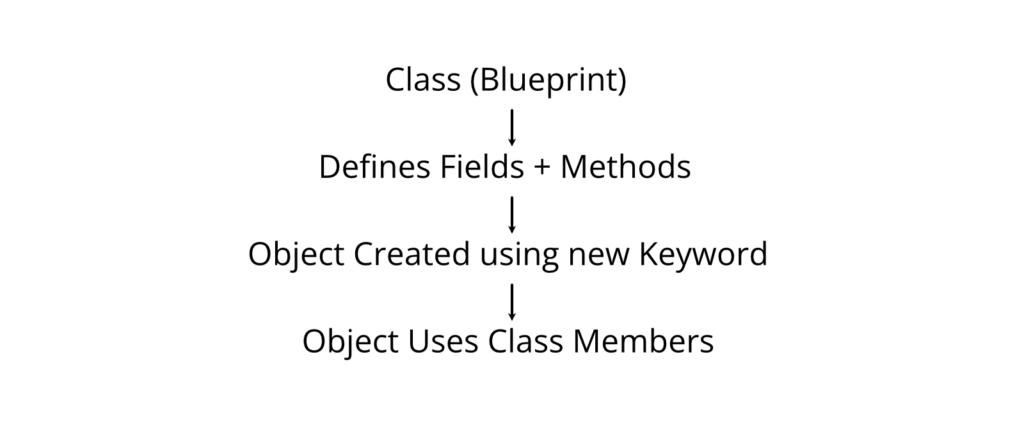
A Class is a user-defined blueprint or template that defines the data (fields) and behavior (methods) of objects. It is one of the fundamental concepts of Object-Oriented Programming (OOP) in C#.
A class specifies what an object will contain and how it will behave. Objects are created from classes, just as many houses can be built from the same blueprint.
Purpose
Classes are used to:
- Represent real-world entities.
- Group related data and methods.
- Support code reusability.
- Implement object-oriented programming.
- Make applications modular and easier to maintain.
Why Classes are Used
Without classes, programs become difficult to organize as they grow larger. Classes help developers:
- Organize code logically.
- Reuse existing code.
- Reduce duplication.
- Improve readability.
- Simplify maintenance.
Working Principle

Real-World Analogy
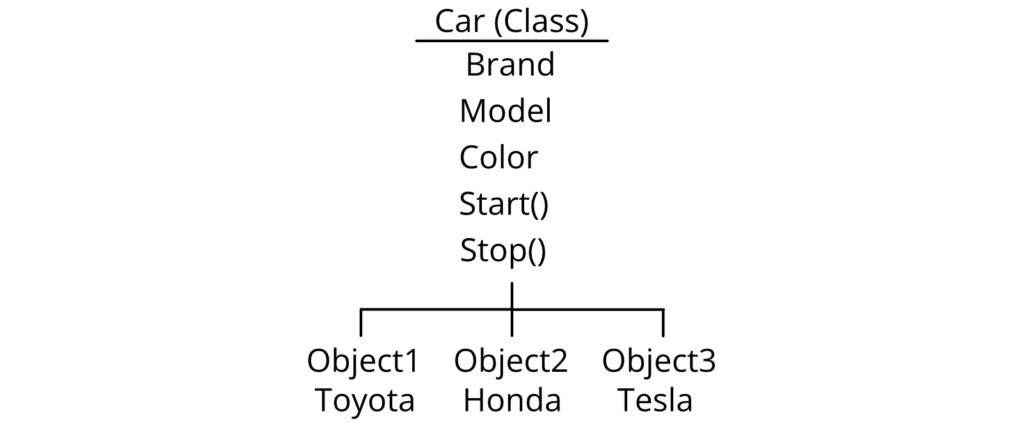
Imagine a Car.
The class defines:
- Brand
- Model
- Color
- Start()
- Stop()
Each actual car (Toyota, Honda, Tesla) is an object created from the same class.

Basic Syntax
class ClassName
{
// Fields
// Constructors
// Methods
// Properties
}
Declaring a Class
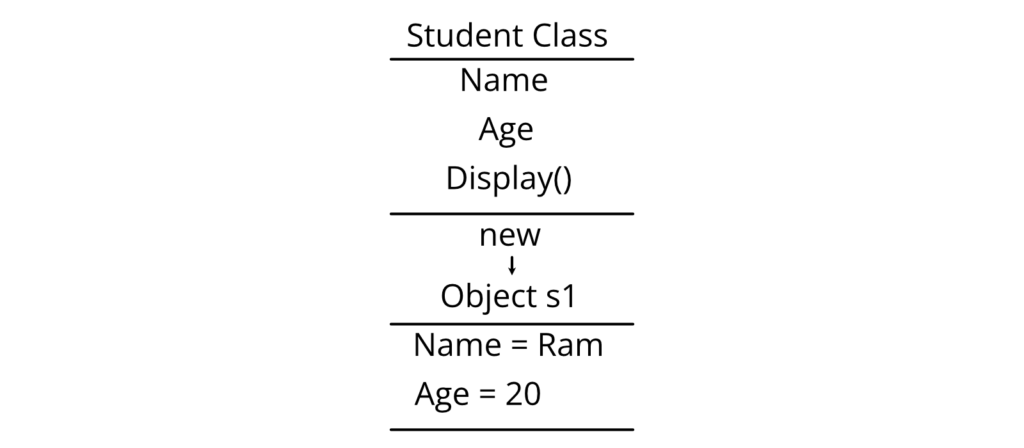
class Student
{
public string Name;
public int Age;
public void Display()
{
Console.WriteLine(Name);
Console.WriteLine(Age);
}
}
Creating an Object
Objects are created using the new keyword.
Syntax
ClassName objectName = new ClassName();
Example
Student s1 = new Student();
Accessing Members
Use the dot (.) operator.
objectName.MemberName
Example
s1.Name = “Ram”;
s1.Age = 20;
s1.Display();
Complete Program
using System;
class Student
{
public string Name;
public int Age;
public void Display()
{
Console.WriteLine(“Name : ” + Name);
Console.WriteLine(“Age : ” + Age);
}
}
class Program
{
static void Main()
{
Student s1 = new Student();
s1.Name = “Ram”;
s1.Age = 20;
s1.Display();
}
}
Output
Name : Ram
Age : 20
Explanation
- A class named Student is created.
- It contains two fields.
- It contains one method.
- The Main() method creates an object.
- Values are assigned.
- The Display() method prints the values.
Memory Representation

Components of a Class
| Component | Description |
| Fields | Store data |
| Methods | Perform tasks |
| Constructors | Initialize objects |
| Properties | Provide controlled access to fields |
| Indexers | Allow object indexing |
| Events | Notify changes |
| Nested Classes | Class inside another class |
Important Notes
- A class is a reference type.
- Objects are stored on the managed heap.
- Multiple objects can be created from one class.
- Every object has its own copy of instance fields.
- Methods can be shared among all objects.
Advantages
- Code reuse
- Modularity
- Easy maintenance
- Better organization
- Supports encapsulation
- Supports inheritance
- Improves scalability
Limitations
- Slight memory overhead compared to value types.
- Excessive object creation can affect performance.
- Poor class design leads to tightly coupled code.
Real-World Applications
Classes are widely used in:
- Banking systems (Account, Customer)
- Hospital management (Patient, Doctor)
- Library systems (Book, Member)
- E-commerce (Product, Order)
- Student management (Student, Teacher)
Common Student Mistakes
❌ Incorrect
Student.Name = “Ram”;
Reason: Name is not static. It belongs to an object.
✔ Correct
Student s = new Student();
s.Name = “Ram”;
❌ Incorrect
Student s;
s.Name = “Ram”;
Reason: Object is declared but not created.
✔ Correct
Student s = new Student();
Best Practices
- Use meaningful class names.
- Follow PascalCase for class names.
- Keep one responsibility per class.
- Avoid making all fields public.
- Use properties instead of public fields in production code.
Viva Questions
- What is a class?
- Why are classes called blueprints?
- What is an object?
- What is the new keyword?
- Where are objects stored in memory?
- Is a class a value type or reference type?
Key Points for Exam
- A class is a blueprint for creating objects.
- Objects are created using the new keyword.
- Members are accessed using the dot (.) operator.
- A class supports encapsulation and code reuse.
Constructors
A Constructor is a special member function of a class that is automatically executed when an object of the class is created. It is primarily used to initialize the object’s data members.
Purpose
Constructors are used to:
- Initialize object data.
- Assign default values.
- Allocate resources if necessary.
- Ensure objects start in a valid state.
Why Constructors are Used
Without constructors, every object would require manual initialization after creation, increasing the chance of errors and inconsistent object states.
Characteristics
- Name must be the same as the class.
- Has no return type.
- Called automatically.
- Executes once per object creation.
- Can be overloaded.
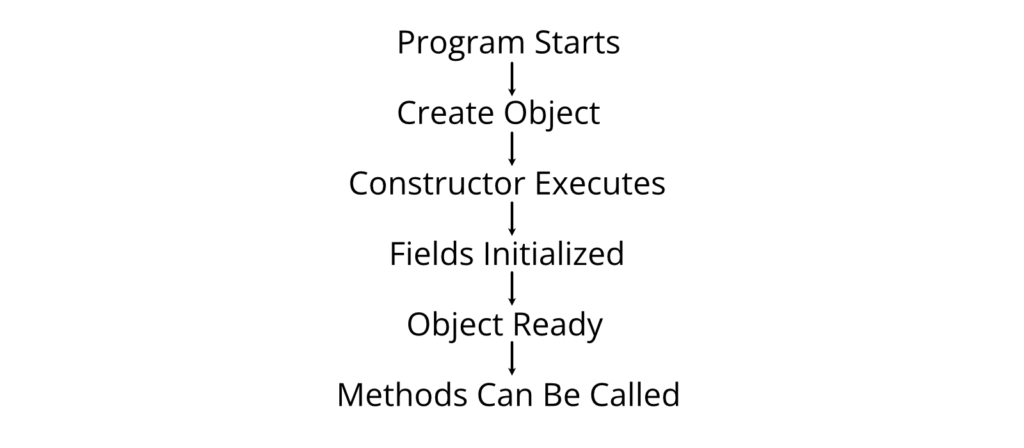
Constructor Execution Flow

Syntax
class Student
{
public Student()
{
}
}
Types of Constructors
- Default Constructor
- Parameterized Constructor
- Copy Constructor (user-defined pattern)
- Static Constructor (covered in Part 2)
Default Constructor
A default constructor takes no parameters and initializes the object with predefined values.
Example
using System;
class Student
{
string name;
public Student()
{
name = “Unknown”;
}
public void Display()
{
Console.WriteLine(name);
}
}
class Program
{
static void Main()
{
Student s = new Student();
s.Display();
}
}
Output
Unknown
Explanation
- new Student() creates the object.
- The constructor runs automatically.
- name is initialized to “Unknown”.
- Display() prints the initialized value.
Parameterized Constructor
A parameterized constructor accepts arguments, allowing different objects to be initialized with different values.
Syntax
ClassName(parameter_list)
{
}
Example
using System;
class Student
{
string name;
int age;
public Student(string n, int a)
{
name = n;
age = a;
}
public void Display()
{
Console.WriteLine(“Name : ” + name);
Console.WriteLine(“Age : ” + age);
}
}
class Program
{
static void Main()
{
Student s = new Student(“Sita”, 21);
s.Display();
}
}
Output
Name : Sita
Age : 21
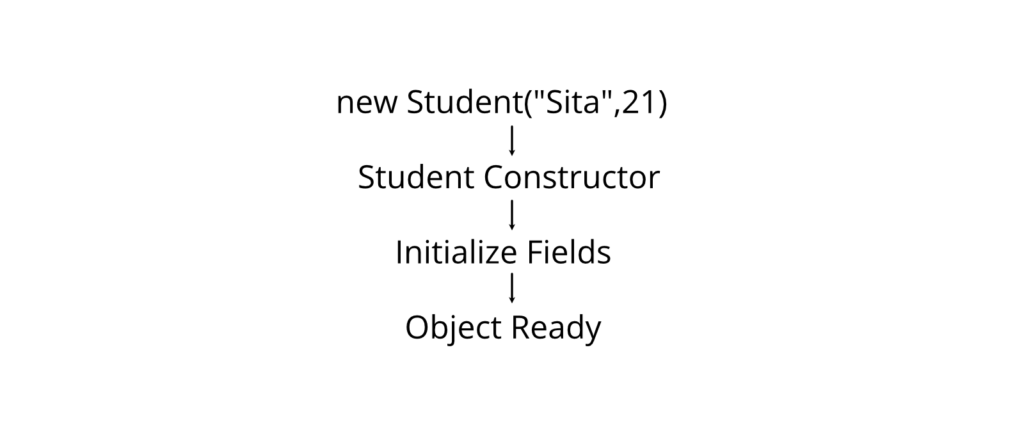
Working Principle
- Object creation begins.
- Memory is allocated.
- Matching constructor is selected based on arguments.
- Constructor initializes fields.
- Control returns to the calling code.
- The object is ready for use.
Constructor Call Diagram

Constructor Overloading
A class can have multiple constructors with different parameter lists.
Example
using System;
class Student
{
public Student()
{
Console.WriteLine(“Default Constructor”);
}
public Student(string name)
{
Console.WriteLine(“Student : ” + name);
}
}
class Program
{
static void Main()
{
Student s1 = new Student();
Student s2 = new Student(“Hari”);
}
}
Output
Default Constructor
Student : Hari
Comparison Table
| Feature | Default Constructor | Parameterized Constructor |
| Parameters | No | Yes |
| Initialization | Fixed values | User-supplied values |
| Flexibility | Low | High |
| Invocation | new ClassName() | new ClassName(args) |
Advantages
- Automatic initialization.
- Reduces coding effort.
- Prevents uninitialized objects.
- Improves code readability.
- Supports constructor overloading.
Limitations
- Cannot have a return type.
- Cannot be called like a normal method.
- Incorrect constructor design may complicate object creation.
Real-World Applications
Constructors are commonly used to initialize:
- Bank account details.
- Student records.
- Product information.
- Database connection settings.
- User profiles in web applications.
Common Student Mistakes
❌ Incorrect
public void Student()
{
}
Reason: This is a method, not a constructor, because it has a return type.
✔ Correct
public Student()
{
}
❌ Incorrect
int Student()
{
return 0;
}
Reason: Constructors cannot return a value.
✔ Correct
Student()
{
}
Best Practices
- Initialize all required fields in constructors.
- Keep constructor logic simple.
- Use parameterized constructors for flexibility.
- Avoid performing lengthy operations inside constructors.
- Overload constructors when multiple initialization options are needed.
Viva Questions
- What is a constructor?
- Why does a constructor have no return type?
- When is a constructor executed?
- Can constructors be overloaded?
- What is the difference between a constructor and a method?
- What is a parameterized constructor?
Key Points for Exam
- Constructors initialize objects automatically.
- Constructor name must match the class name.
- Constructors have no return type.
- Constructor overloading is achieved using different parameter lists.
- Default and parameterized constructors are the most commonly used types.
Deconstructors (Deconstruction)
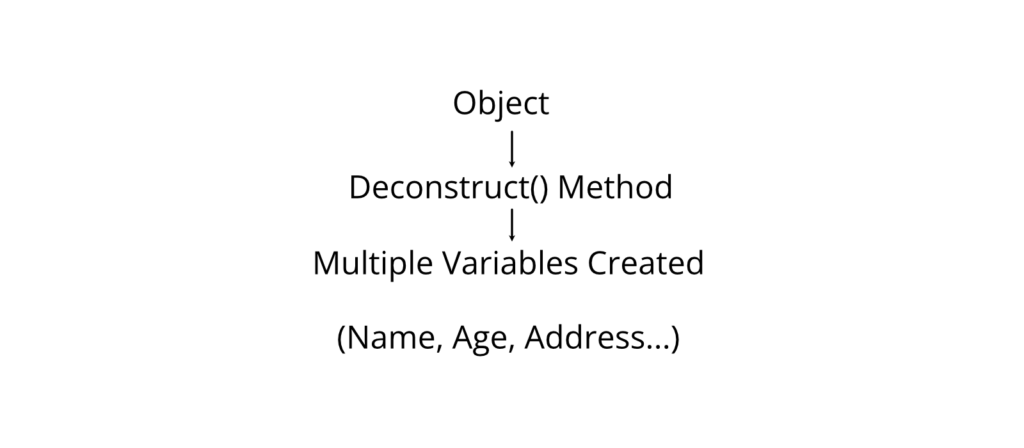
Deconstruction is a C# feature that allows an object to be broken down into multiple individual variables using a special Deconstruct() method.
It provides a convenient way to extract values from an object in a single statement.
Purpose
Deconstruction is used to:
- Extract multiple values from an object.
- Simplify code.
- Improve readability.
- Support tuple-like assignment.
- Make object data easier to access.
Why It Is Used
Normally, individual properties must be accessed separately.
Example:
string name = student.Name;
int age = student.Age;
Using deconstruction:
(string name, int age) = student;
This is shorter, cleaner, and easier to read.
Working Principle

Syntax
class ClassName
{
public void Deconstruct(out Type1 value1,
out Type2 value2)
{
value1 = …;
value2 = …;
}
}
How Deconstruction Works
- An object is created.
- The object contains a Deconstruct() method.
- The compiler automatically calls Deconstruct().
- Values are assigned to output variables.
- Individual variables become available.
Example 1: Basic Deconstruction
using System;
class Student
{
public string Name;
public int Age;
public Student(string n, int a)
{
Name = n;
Age = a;
}
public void Deconstruct(out string name, out int age)
{
name = Name;
age = Age;
}
}
class Program
{
static void Main()
{
Student s = new Student(“Ram”, 20);
(string studentName, int studentAge) = s;
Console.WriteLine(studentName);
Console.WriteLine(studentAge);
}
}
Output
Ram
20
Explanation
- A Student object is created.
- Deconstruct() returns two values.
- Values are stored in studentName and studentAge.
- The variables are printed.
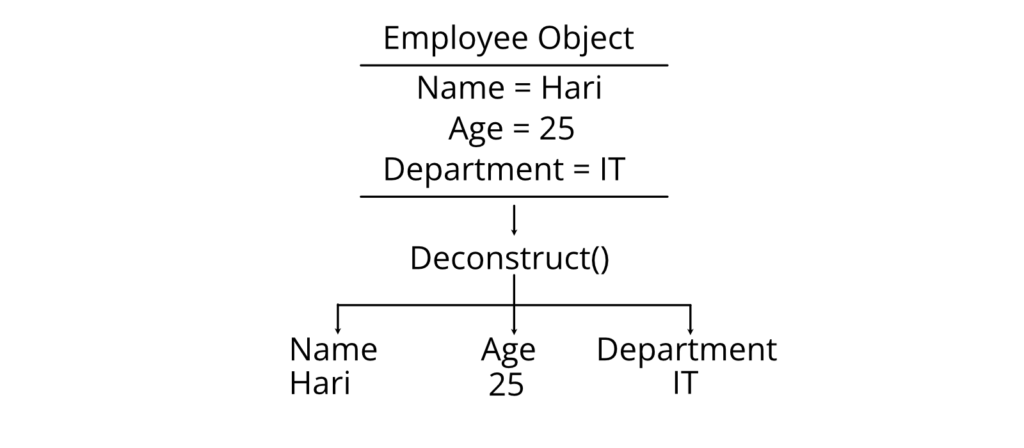
Example 2: Three-Value Deconstruction
using System;
class Employee
{
public string Name;
public int Age;
public string Department;
public Employee(string n, int a, string d)
{
Name = n;
Age = a;
Department = d;
}
public void Deconstruct(out string name,
out int age,
out string dept)
{
name = Name;
age = Age;
dept = Department;
}
}
class Program
{
static void Main()
{
Employee e = new Employee(“Hari”, 25, “IT”);
(string name, int age, string department) = e;
Console.WriteLine(name);
Console.WriteLine(age);
Console.WriteLine(department);
}
}
Output
Hari
25
IT
Memory Representation

Advantages
- Cleaner syntax.
- Easier value extraction.
- Better readability.
- Reduces repetitive code.
- Works well with tuples.
Limitations
- Requires a Deconstruct() method.
- Can reduce readability if too many values are extracted.
- Not supported in older C# versions.
Real-World Applications
Deconstruction is useful in:
- Student information systems.
- Banking applications.
- Employee management systems.
- Database record retrieval.
- API response processing.
Comparison Table
| Feature | Traditional Access | Deconstruction |
| Number of statements | Multiple | One |
| Readability | Moderate | High |
| Code size | Longer | Shorter |
| Object required | Yes | Yes |
Common Student Mistakes
❌ Incorrect
(string n, int a) = student;
without defining:
Deconstruct(…)
Reason: The compiler cannot find a Deconstruct() method.
✔ Correct
public void Deconstruct(out string name,
out int age)
{
name = Name;
age = Age;
}
❌ Incorrect
public int Deconstruct(…)
Reason: Deconstruct() must have a void return type.
✔ Correct
public void Deconstruct(…)
Best Practices
- Keep Deconstruct() methods simple.
- Return only meaningful values.
- Avoid deconstructing too many fields at once.
- Use descriptive variable names.
- Use deconstruction only when it improves readability.
Viva Questions
- What is deconstruction in C#?
- What is the purpose of the Deconstruct() method?
- Can multiple values be returned using deconstruction?
- What is the return type of Deconstruct()?
- How is deconstruction different from a constructor?
Key Points for Exam
- Deconstruction extracts multiple values from an object.
- It uses the Deconstruct() method.
- The method returns values through out parameters.
- It simplifies object value extraction.
thisReference
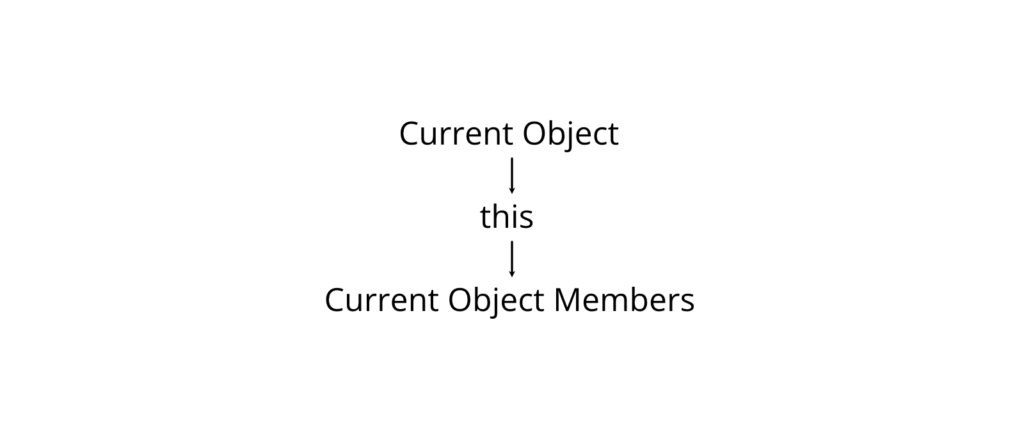
The this keyword is a reference variable that refers to the current object of a class.
It is used to access the current object’s members and resolve naming conflicts between instance variables and method or constructor parameters.
Purpose
The this keyword is used to:
- Refer to the current object.
- Differentiate fields from parameters with the same name.
- Invoke another constructor in the same class.
- Pass the current object as an argument.
- Return the current object.
Why It Is Used
When parameter names are the same as field names, the compiler cannot distinguish between them without this.
Working Principle

Syntax
this.memberName
Example 1: Accessing Current Object
using System;
class Student
{
string name;
public Student(string name)
{
this.name = name;
}
public void Display()
{
Console.WriteLine(this.name);
}
}
class Program
{
static void Main()
{
Student s = new Student(“Sita”);
s.Display();
}
}
Output
Sita
Explanation
- name is both a field and a parameter.
- this.name refers to the field.
- name refers to the constructor parameter.
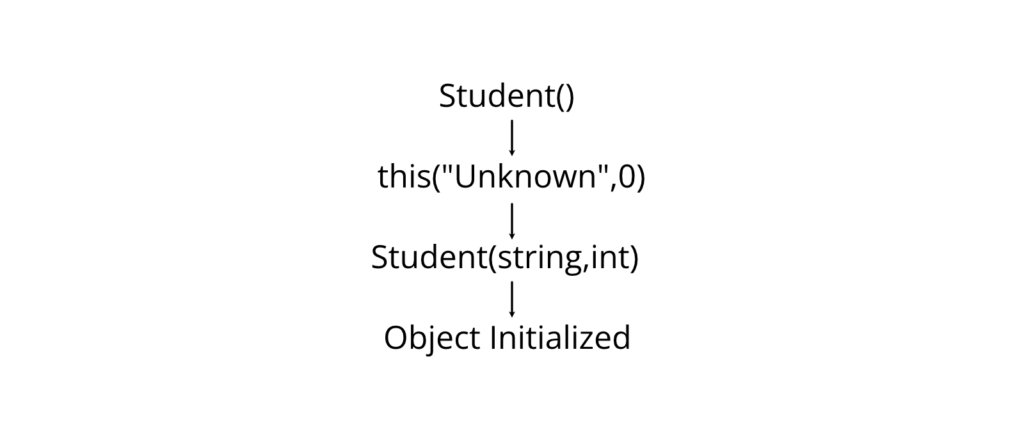
Example 2: Constructor Chaining Using this
A constructor can call another constructor in the same class using the this keyword.
using System;
class Student
{
string name;
int age;
public Student() : this(“Unknown”, 0)
{
}
public Student(string name, int age)
{
this.name = name;
this.age = age;
}
public void Display()
{
Console.WriteLine(“Name : ” + name);
Console.WriteLine(“Age : ” + age);
}
}
class Program
{
static void Main()
{
Student s = new Student();
s.Display();
}
}
Output
Name : Unknown
Age : 0
Constructor Chaining Diagram

Example 3: Passing Current Object
using System;
class Student
{
public void Show()
{
Helper.Display(this);
}
}
class Helper
{
public static void Display(Student s)
{
Console.WriteLine(“Current object received.”);
}
}
class Program
{
static void Main()
{
Student s = new Student();
s.Show();
}
}
Output
Current object received.
Uses of this
| Use | Description |
| Access current object | this.name |
| Resolve naming conflicts | Field vs parameter |
| Constructor chaining | : this(…) |
| Pass current object | Method(this) |
| Return current object | return this; |
Comparison Table
| Feature | this | base |
| Refers to | Current object | Base class object |
| Used inside | Same class | Derived class |
| Constructor chaining | Yes | No |
| Access parent members | No | Yes |
Advantages
- Improves code clarity.
- Eliminates ambiguity.
- Supports constructor chaining.
- Enables fluent APIs.
- Makes object references explicit.
Limitations
- Cannot be used in static methods because static methods do not belong to an object instance.
- Refers only to the current object.
- Cannot access base-class members directly (use base instead).
Real-World Applications
The this keyword is commonly used in:
- Banking applications to initialize account details.
- Inventory systems to assign product information.
- Student management systems to initialize student records.
- Builder and fluent design patterns.
Common Student Mistakes
❌ Incorrect
public static void Show()
{
Console.WriteLine(this);
}
Reason: this cannot be used in a static method.
✔ Correct
public void Show()
{
Console.WriteLine(this);
}
❌ Incorrect
name = name;
Reason: The parameter is assigned to itself; the field remains unchanged.
✔ Correct
this.name = name;
Best Practices
- Use this only when necessary to improve readability.
- Use constructor chaining to reduce duplicate code.
- Avoid unnecessary use of this when there is no ambiguity.
- Follow consistent naming conventions for fields and parameters.
Viva Questions
- What is the this keyword?
- Why is this required when parameter names match field names?
- Can this be used in static methods? Why or why not?
- What is constructor chaining?
- How can this be used to pass the current object?
Key Points for Exam
- this refers to the current object.
- It resolves ambiguity between fields and parameters.
- It enables constructor chaining using : this(…).
- It can pass or return the current object.
- It cannot be used in static methods.
Properties
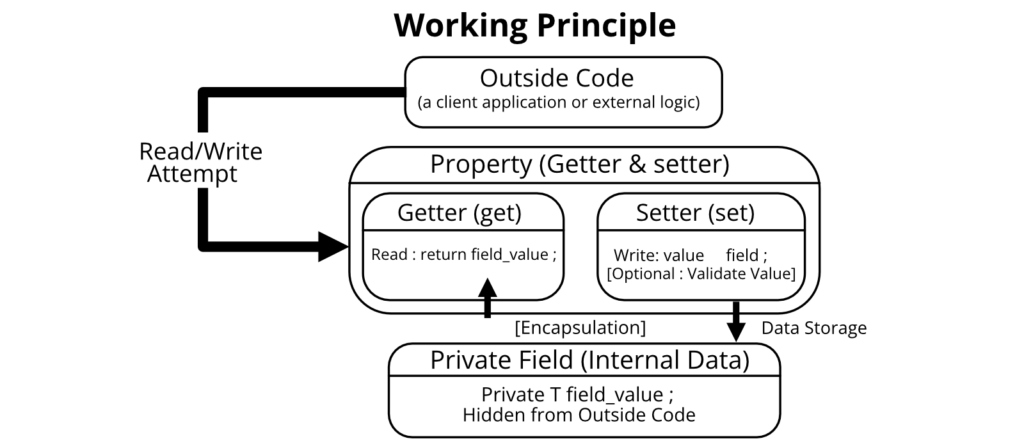
A Property is a special member of a class that provides a controlled way to read, write, or compute the value of a private field.
Properties act as an interface between the class’s private data and the outside world. They support the principle of Encapsulation by hiding the implementation details while allowing safe access to data.
Purpose
Properties are used to:
- Provide controlled access to class fields.
- Protect data from invalid values.
- Implement encapsulation.
- Improve code readability and maintainability.
- Perform validation before storing data.
Why Properties are Used
Suppose a Student class has an Age field. If the field is declared public, any user can assign an invalid value such as -10.
Using a property, we can validate the value before assigning it.
Working Principle

Syntax
class ClassName
{
private DataType fieldName;
public DataType PropertyName
{
get
{
return fieldName;
}
set
{
fieldName = value;
}
}
}
Components of a Property
| Component | Purpose |
| private field | Stores the actual data |
| get | Returns the value |
| set | Assigns a value |
| value | Implicit parameter used inside set |
Example 1: Property with Get and Set
using System;
class Student
{
private string name;
public string Name
{
get
{
return name;
}
set
{
name = value;
}
}
}
class Program
{
static void Main()
{
Student s = new Student();
s.Name = “Ram”;
Console.WriteLine(s.Name);
}
}
Output
Ram
Explanation
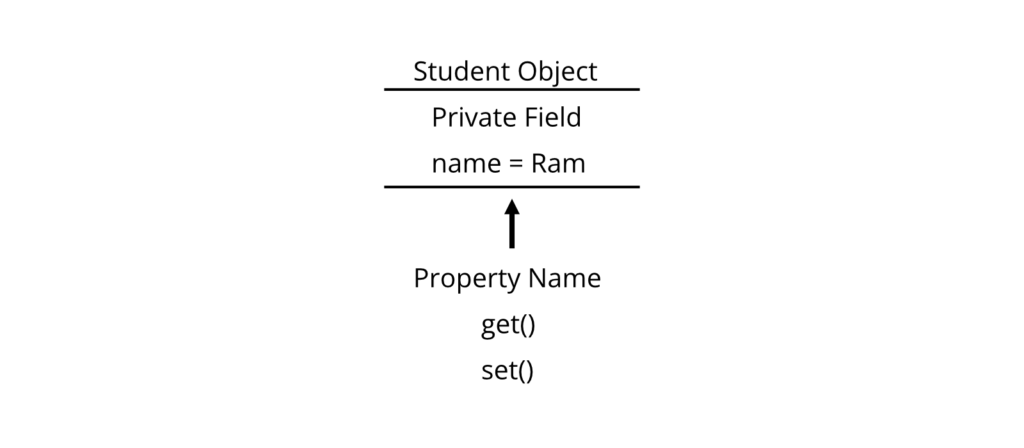
- name is private.
- External code cannot access it directly.
- The property Name provides controlled access.
- set stores the value.
- get retrieves the value.
Example 2: Property with Validation
using System;
class Student
{
private int age;
public int Age
{
get
{
return age;
}
set
{
if (value >= 0)
age = value;
else
Console.WriteLine(“Invalid Age”);
}
}
}
class Program
{
static void Main()
{
Student s = new Student();
s.Age = 20;
Console.WriteLine(s.Age);
s.Age = -5;
}
}
Output
20
Invalid Age
Explanation
- Only non-negative values are accepted.
- Invalid values are rejected.
- The object’s data remains valid.
Auto-Implemented Properties
When no extra validation is required, C# allows auto-implemented properties.
Syntax
public string Name
{
get;
set;
}
Example
using System;
class Student
{
public string Name
{
get;
set;
}
public int Age
{
get;
set;
}
}
class Program
{
static void Main()
{
Student s = new Student();
s.Name = “Sita”;
s.Age = 21;
Console.WriteLine(s.Name);
Console.WriteLine(s.Age);
}
}
Output
Sita
21
Read-Only Property
A read-only property contains only a get accessor.
public int RollNo
{
get;
}
The value can typically be assigned through a constructor.
Write-Only Property
A write-only property contains only a set accessor.
private string password;
public string Password
{
set
{
password = value;
}
}
Property Types
| Property Type | Description |
| Read-Write | Has both get and set |
| Read-Only | Has only get |
| Write-Only | Has only set |
| Auto-Implemented | Compiler creates the backing field automatically |
Memory Representation

Properties vs Public Fields
| Feature | Public Field | Property |
| Encapsulation | No | Yes |
| Validation | No | Yes |
| Security | Low | High |
| Recommended | No | Yes |
| Flexibility | Limited | High |
Advantages
- Supports encapsulation.
- Allows validation.
- Improves security.
- Easy to maintain.
- Works with data binding in GUI applications.
Limitations
- Slightly more code than public fields.
- Poorly designed validation may affect performance.
- Write-only properties are rarely recommended because they cannot be read.
Real-World Applications
Properties are used in:
- Student Management Systems
- Banking Applications
- Employee Records
- E-commerce Product Catalogs
- Hospital Information Systems
Common Student Mistakes
❌ Incorrect
public int Age;
when validation is required.
✔ Correct
private int age;
public int Age
{
get { return age; }
set
{
if (value >= 0)
age = value;
}
}
❌ Incorrect
set
{
age = Age;
}
Reason: This causes infinite recursion because Age calls the property itself.
✔ Correct
set
{
age = value;
}
Best Practices
- Keep fields private.
- Use properties for public access.
- Validate data inside the set accessor.
- Prefer auto-properties when no validation is needed.
- Use meaningful property names in PascalCase.
Viva Questions
- What is a property?
- Why are properties preferred over public fields?
- What is the difference between get and set?
- What is an auto-implemented property?
- What is the purpose of the value keyword?
Key Points for Exam
- Properties provide controlled access to private fields.
- get reads data; set writes data.
- Properties support encapsulation.
- Auto-properties reduce code.
- Validation can be performed in the set accessor.
Indexers
An Indexer is a special member of a class that allows an object to be accessed like an array using an index.
Instead of calling methods such as Get() or Set(), indexers allow array-like syntax.
Purpose
Indexers are used to:
- Access object data using indexes.
- Simplify collection-like classes.
- Improve readability.
- Hide internal data structures.
- Provide array-like behavior.
Why Indexers are Used
Without an indexer:
student.GetName(0);
With an indexer:
student[0];
The second approach is shorter and easier to understand.
Working Principle


Syntax
public DataType this[int index]
{
get
{
…
}
set
{
…
}
}
Example: Indexer
using System;
class Student
{
private string[] names = new string[3];
public string this[int index]
{
get
{
return names[index];
}
set
{
names[index] = value;
}
}
}
class Program
{
static void Main()
{
Student s = new Student();
s[0] = “Ram”;
s[1] = “Sita”;
s[2] = “Hari”;
Console.WriteLine(s[0]);
Console.WriteLine(s[1]);
Console.WriteLine(s[2]);
}
}
Output
Ram
Sita
Hari
Explanation
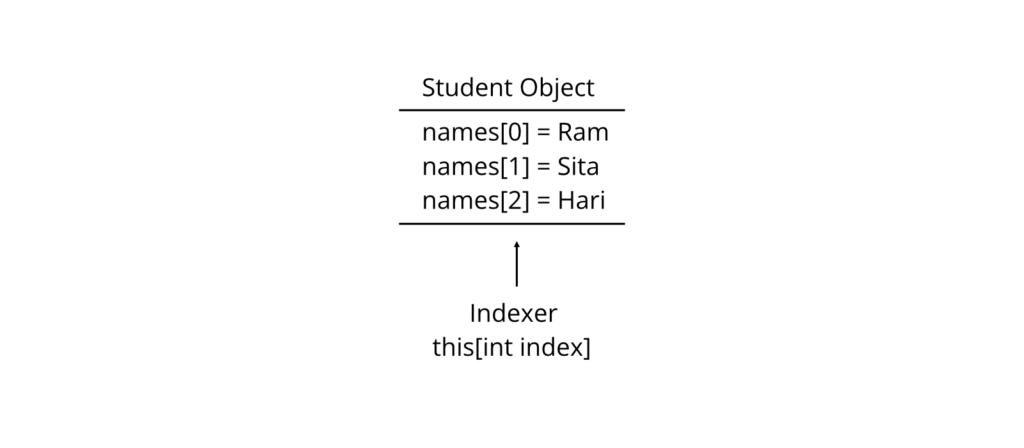
- names is a private array.
- The indexer provides controlled access.
- s[0] calls the get or set accessor automatically.
- The object behaves like an array.
Memory Representation

Indexers vs Properties
| Feature | Property | Indexer |
| Name | Has a name | Uses this |
| Parameters | No | Yes |
| Access | obj.Name | obj[0] |
| Purpose | Access a single value | Access indexed values |
Advantages
- Makes classes easier to use.
- Provides array-like syntax.
- Supports encapsulation.
- Improves readability.
- Hides internal implementation.
Limitations
- Mainly useful for collection-like classes.
- Invalid indexes can cause exceptions.
- Overusing indexers may reduce code clarity.
Real-World Applications
Indexers are commonly used in:
- Library management systems
- Student record collections
- Product catalogs
- Shopping carts
- Inventory systems
- Custom collection classes
Common Student Mistakes
❌ Incorrect
public string Index[int i]
{
}
Reason: Indexers do not have a custom name.
✔ Correct
public string this[int i]
{
get;
set;
}
❌ Incorrect
Console.WriteLine(s[5]);
when the array size is only 3.
Reason: Causes an IndexOutOfRangeException.
✔ Correct
Console.WriteLine(s[2]);
Best Practices
- Validate index values before accessing data.
- Use indexers only when array-like access is meaningful.
- Keep indexer logic simple.
- Document the valid range of indexes.
Viva Questions
- What is an indexer?
- Why does an indexer use the this keyword?
- How is an indexer different from a property?
- Can an indexer have get and set accessors?
- Where are indexers commonly used?
Key Points for Exam
- An indexer allows objects to be accessed like arrays.
- It is declared using the this keyword.
- Indexers contain get and set accessors.
- They are commonly used in collection classes.
Summary Table
| Topic | Key Idea |
| Classes | Blueprint for creating objects |
| Constructors | Initialize objects automatically |
| Deconstruction | Extract multiple values using Deconstruct() |
| this Reference | Refers to the current object |
| Properties | Controlled access to private fields |
| Indexers | Allow array-like access to objects |
Practical/Laboratory Preparation
Be able to write programs that:
- Create classes and objects.
- Use default and parameterized constructors.
- Implement a Deconstruct() method.
- Demonstrate the this keyword and constructor chaining.
- Create properties with validation.
- Use auto-implemented properties.
- Implement an indexer for a custom class.
Last-Minute Revision Checklist
- ✔ Understand the difference between a class and an object.
- ✔ Know the purpose of constructors and constructor overloading.
- ✔ Practice writing a Deconstruct() method.
- ✔ Remember when and why to use the this keyword.
- ✔ Be able to create properties with get and set.
- ✔ Know the syntax and purpose of auto-properties.
- ✔ Understand how an indexer differs from a property.
- ✔ Practice writing complete C# programs for all major concepts.
Static Constructors
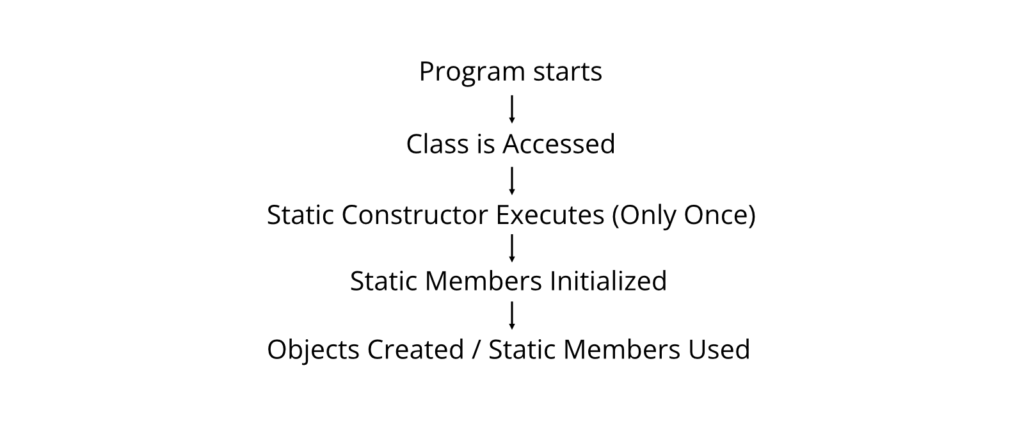
A Static Constructor is a special constructor that is used to initialize static members of a class. It is executed automatically only once, before the first object is created or before any static member is accessed.
Unlike instance constructors, a static constructor initializes data that belongs to the class itself rather than individual objects.
Purpose
Static constructors are used to:
- Initialize static fields.
- Perform one-time setup for a class.
- Load configuration values.
- Establish static resources before the class is used.
Why It Is Used
Suppose a class contains a static variable that stores the name of a university. Since this value is common to all objects, it should be initialized only once.
Without a static constructor, the static variable would have to be initialized manually.
Working Principle

Characteristics
- Has the same name as the class.
- Uses the static keyword.
- Has no return type.
- Cannot have parameters.
- Cannot be called explicitly.
- Executes only once during the application’s lifetime.
- A class can have only one static constructor.
Syntax
class ClassName
{
static ClassName()
{
// Initialization code
}
}
Example 1: Static Constructor
using System;
class University
{
public static string UniversityName;
static University()
{
UniversityName = “Tribhuvan University”;
Console.WriteLine(“Static Constructor Executed”);
}
public void Display()
{
Console.WriteLine(“University: ” + UniversityName);
}
}
class Program
{
static void Main()
{
University u1 = new University();
u1.Display();
University u2 = new University();
u2.Display();
}
}
Output
Static Constructor Executed
University: Tribhuvan University
University: Tribhuvan University
Explanation
- The class is accessed for the first time.
- The static constructor runs automatically.
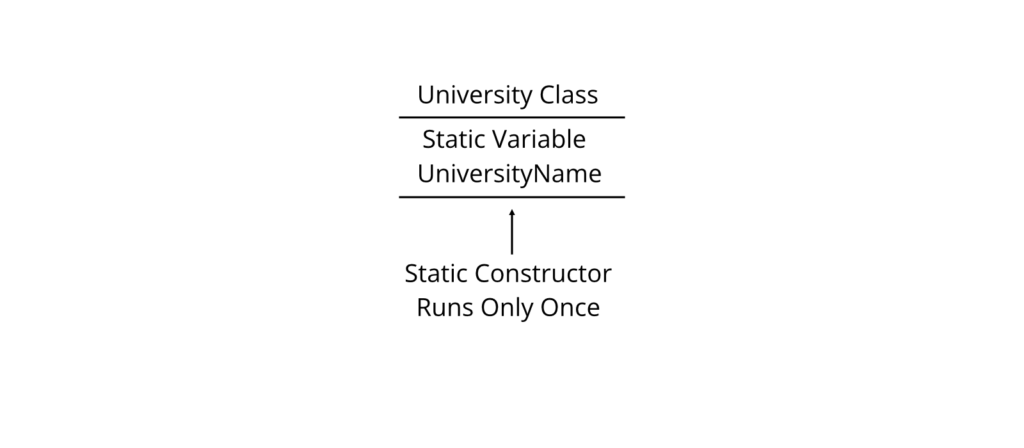
- UniversityName is initialized.
- The second object does not execute the static constructor again.
Memory Representation

Static Constructor vs Instance Constructor
| Feature | Static Constructor | Instance Constructor |
| Keyword | static | None |
| Parameters | Not allowed | Allowed |
| Called | Automatically once | Every object creation |
| Purpose | Initialize static members | Initialize instance members |
| Number Allowed | One | Multiple (overloaded) |
Advantages
- Executes automatically.
- Ensures one-time initialization.
- Reduces duplicate initialization code.
- Improves efficiency for shared data.
Limitations
- Cannot accept parameters.
- Cannot be overloaded.
- Cannot be called manually.
- Exceptions thrown in a static constructor can prevent the class from being used.
Real-World Applications
Static constructors are commonly used for:
- Loading application settings.
- Initializing database connection strings.
- Setting company or university names.
- Loading shared configuration values.
- Registering application-wide services.
Common Student Mistakes
❌ Incorrect
static Student(int x)
{
}
Reason: Static constructors cannot have parameters.
✔ Correct
static Student()
{
}
❌ Incorrect
Student.Student();
Reason: Static constructors cannot be called directly.
✔ Correct
They execute automatically when the class is first used.
Best Practices
- Keep static constructors simple.
- Avoid lengthy operations.
- Initialize only static members.
- Handle exceptions carefully.
Viva Questions
- What is a static constructor?
- When is a static constructor executed?
- Can a static constructor have parameters?
- How many static constructors can a class have?
- What is the difference between static and instance constructors?
Key Points for Exam
- Static constructors initialize static members.
- They execute only once.
- They cannot have parameters.
- They cannot be called explicitly.
Static Classes
A Static Class is a class that contains only static members and cannot be instantiated.
A static class acts as a container for methods and data that are shared across the application.
Purpose
Static classes are used to:
- Store utility methods.
- Provide helper functions.
- Share common data.
- Avoid unnecessary object creation.
Why It Is Used
Some operations do not require objects. For example, mathematical calculations are independent of any particular object.
Instead of:
Calculator c = new Calculator();
c.Add();
We can directly write:
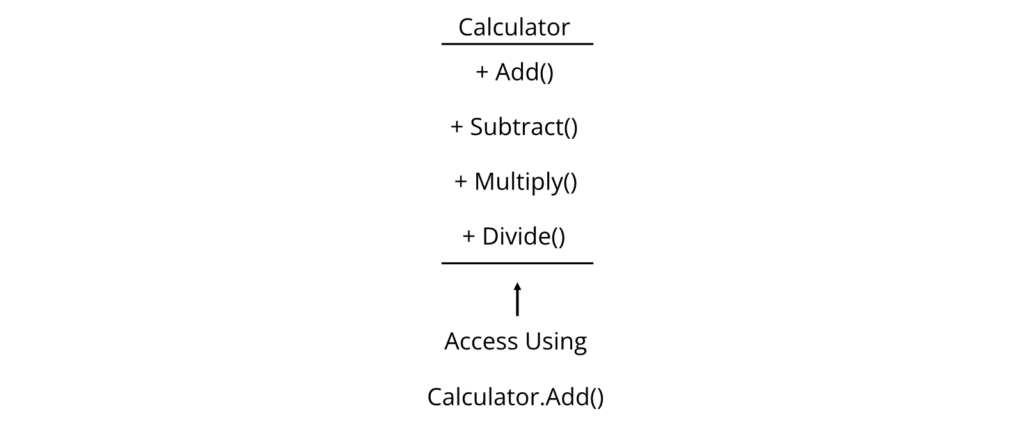
Calculator.Add();
Working Principle


Syntax
static class ClassName
{
public static void MethodName()
{
}
}
Example
using System;
static class Calculator
{
public static int Add(int a, int b)
{
return a + b;
}
}
class Program
{
static void Main()
{
Console.WriteLine(Calculator.Add(10, 20));
}
}
Output
30
Explanation
- Calculator is a static class.
- No object is created.
- The method is accessed directly using the class name.
Characteristics
- Cannot create objects.
- Contains only static members.
- Automatically sealed (cannot be inherited).
- Cannot contain instance constructors.
- May contain a static constructor.
Static Class Diagram

Static Class vs Normal Class
| Feature | Static Class | Normal Class |
| Object Creation | Not allowed | Allowed |
| Instance Members | Not allowed | Allowed |
| Static Members | Allowed | Allowed |
| Inheritance | Cannot inherit | Can inherit |
| Constructor | Static only | Instance and static |
Advantages
- Saves memory.
- No unnecessary object creation.
- Easy access to utility methods.
- Improves code organization.
Limitations
- Cannot be instantiated.
- Cannot participate in inheritance.
- Cannot implement instance behavior.
Real-World Applications
Static classes are commonly used for:
- Mathematical utilities.
- File helper methods.
- String manipulation.
- Date and time utilities.
- Application-wide constants.
Common Student Mistakes
❌ Incorrect
Calculator c = new Calculator();
Reason: Static classes cannot be instantiated.
✔ Correct
Calculator.Add(5, 10);
❌ Incorrect
static class Student
{
public int Age;
}
Reason: Static classes cannot contain instance fields.
✔ Correct
public static int Age;
Best Practices
- Use static classes only for utility functionality.
- Keep methods independent of object state.
- Avoid storing mutable global data in static fields.
Viva Questions
- What is a static class?
- Why can’t static classes be instantiated?
- Can a static class contain instance methods?
- Can a static class inherit another class?
- Give examples of static classes.
Key Points for Exam
- Static classes cannot have objects.
- All members must be static.
- They are accessed using the class name.
- They are useful for helper and utility methods.
Finalizers
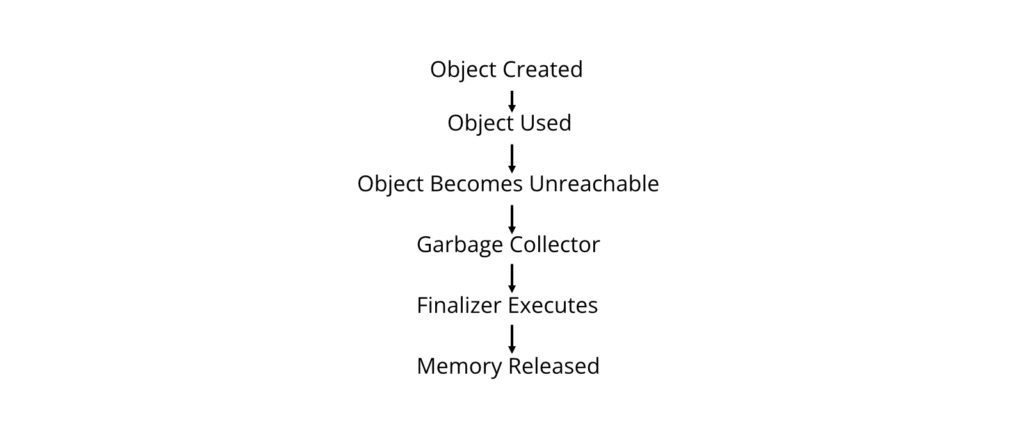
A Finalizer is a special method that is automatically executed by the .NET Garbage Collector before an object is permanently removed from memory.
A finalizer is also known as a destructor in C# syntax.
Purpose
Finalizers are used to:
- Release unmanaged resources.
- Perform cleanup before object destruction.
- Free operating system resources such as file handles or database connections.
Why It Is Used
The .NET Garbage Collector automatically frees managed memory. However, unmanaged resources require explicit cleanup.
Working Principle

Syntax
class Student
{
~Student()
{
// Cleanup code
}
}
Example
using System;
class Student
{
~Student()
{
Console.WriteLine(“Finalizer Executed”);
}
}
class Program
{
static void Main()
{
Student s = new Student();
Console.WriteLine(“Program Running”);
}
}
Possible Output
Program Running
Finalizer Executed
Note: The exact time when the finalizer runs is not deterministic because it depends on the .NET Garbage Collector.
Explanation
- The object is created.
- After it becomes unreachable, the Garbage Collector eventually invokes the finalizer.
- Cleanup operations are performed before memory is reclaimed.
Characteristics
- Begins with the ~ symbol.
- Has no return type.
- Has no parameters.
- Cannot be overloaded.
- Invoked automatically by the Garbage Collector.
- Cannot be called directly.
Finalizer vs Constructor
| Feature | Constructor | Finalizer |
| Purpose | Initialize object | Clean up object |
| Execution | Object creation | Before garbage collection |
| Parameters | Allowed | Not allowed |
| Called by | Programmer (new) | Garbage Collector |
| Number | Multiple | One |
Advantages
- Cleans unmanaged resources.
- Prevents resource leaks.
- Executes automatically.
Limitations
- Execution time is unpredictable.
- Slows garbage collection if overused.
- Should not be relied upon for timely resource release.
- Most managed resources should instead use the IDisposable pattern with Dispose().
Real-World Applications
Finalizers may be used when working with:
- File handles.
- Database connections.
- Network sockets.
- Native Windows resources.
- Unmanaged libraries.
Common Student Mistakes
❌ Incorrect
Student.~Student();
Reason: Finalizers cannot be called directly.
✔ Correct
The Garbage Collector invokes the finalizer automatically.
❌ Incorrect
~Student(int x)
{
}
Reason: Finalizers cannot have parameters.
✔ Correct
~Student()
{
}
Best Practices
- Use finalizers only when necessary.
- Prefer IDisposable for deterministic cleanup of resources.
- Keep finalizer code short and efficient.
- Do not depend on the exact execution time of a finalizer.
Viva Questions
- What is a finalizer?
- Who calls a finalizer?
- Can a finalizer have parameters?
- What is the difference between a constructor and a finalizer?
- Why is the execution time of a finalizer unpredictable?
Key Points for Exam
- Finalizers are executed by the Garbage Collector.
- They are used to release unmanaged resources.
- They have no parameters and no return type.
- They cannot be called explicitly.
- Their execution time is not guaranteed.
Dynamic Binding
Dynamic Binding (also called Late Binding or Runtime Polymorphism) is the process of determining which method to execute at runtime rather than at compile time.
In C#, dynamic binding is mainly achieved through method overriding, the dynamic keyword, and polymorphism.
Purpose
Dynamic binding is used to:
- Support runtime polymorphism.
- Allow derived classes to provide their own implementation of base class methods.
- Increase flexibility and extensibility.
- Enable writing generic and reusable code.
Why It Is Used
Consider a drawing application where different shapes (Circle, Rectangle, Triangle) have different ways of drawing themselves. Instead of writing separate code for each shape, dynamic binding allows a common interface while selecting the correct implementation at runtime.
Working Principle

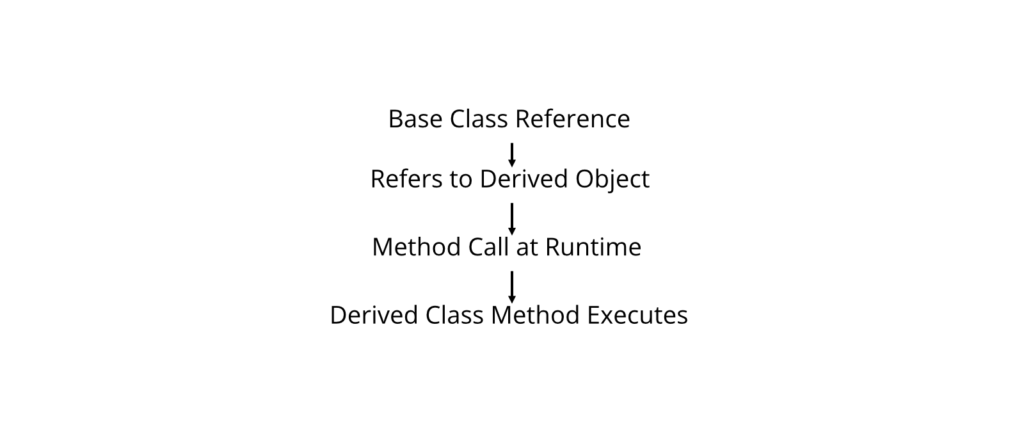
Dynamic Binding vs Static Binding
| Feature | Static Binding | Dynamic Binding |
| Decision Time | Compile Time | Runtime |
| Polymorphism | Compile-time | Runtime |
| Speed | Faster | Slightly Slower |
| Method Selection | Compiler | CLR at Runtime |
Syntax
class Base
{
public virtual void Show()
{
}
}
class Derived : Base
{
public override void Show()
{
}
}
Example 1: Dynamic Binding Using Method Overriding
using System;
class Animal
{
public virtual void Sound()
{
Console.WriteLine(“Animal makes a sound”);
}
}
class Dog : Animal
{
public override void Sound()
{
Console.WriteLine(“Dog barks”);
}
}
class Cat : Animal
{
public override void Sound()
{
Console.WriteLine(“Cat meows”);
}
}
class Program
{
static void Main()
{
Animal a;
a = new Dog();
a.Sound();
a = new Cat();
a.Sound();
}
}
Output
Dog barks
Cat meows
Explanation
- a is a reference of type Animal.
- It first points to a Dog object.
- The overridden Sound() method in Dog executes.
- Later it points to a Cat object.
- The Cat version of Sound() executes.
The method is selected during runtime, demonstrating dynamic binding.
Example 2: Using the dynamic Keyword
The dynamic keyword defers type checking until runtime.
using System;
class Program
{
static void Main()
{
dynamic value;
value = 100;
Console.WriteLine(value);
value = “Hello”;
Console.WriteLine(value);
value = 3.14;
Console.WriteLine(value);
}
}
Output
100
Hello
3.14
Explanation
- The variable value changes its type at runtime.
- Type checking occurs during execution instead of compilation.
Runtime Method Selection Diagram


Advantages
- Supports runtime polymorphism.
- Improves flexibility.
- Promotes reusable code.
- Simplifies software maintenance.
- Supports extensible application design.
Limitations
- Slightly slower than static binding due to runtime method resolution.
- Excessive use of dynamic may reduce type safety.
- Runtime errors may occur if members are missing.
Real-World Applications
Dynamic binding is used in:
- GUI frameworks.
- Game development.
- Banking systems with different account types.
- Payroll systems.
- Plugin architectures.
Common Student Mistakes
❌ Incorrect
public void Show()
{
}
when runtime polymorphism is intended.
✔ Correct
public virtual void Show()
{
}
and
public override void Show()
{
}
❌ Incorrect
dynamic x = “ABC”;
Console.WriteLine(x.Lengthh);
Reason: Lengthh is misspelled. The error occurs at runtime because dynamic bypasses compile-time checking.
✔ Correct
dynamic x = “ABC”;
Console.WriteLine(x.Length);
Best Practices
- Prefer virtual methods and overriding for polymorphism.
- Use the dynamic keyword only when necessary.
- Avoid overusing runtime binding where compile-time checking is sufficient.
- Keep overridden methods consistent with base class behavior.
Viva Questions
- What is dynamic binding?
- What is the difference between static and dynamic binding?
- What is runtime polymorphism?
- What is the purpose of the virtual keyword?
- What is the dynamic keyword?
Key Points for Exam
- Dynamic binding selects methods at runtime.
- It supports runtime polymorphism.
- virtual and override are essential for method overriding.
- The dynamic keyword postpones type checking until runtime.
Operator Overloading
Operator Overloading is a feature in C# that allows existing operators to have user-defined meanings when applied to objects of a class.
For example, the + operator normally adds numbers. With operator overloading, it can also combine two objects.
Purpose
Operator overloading is used to:
- Make objects behave like built-in data types.
- Improve code readability.
- Simplify mathematical operations.
- Support object-oriented programming.
Why It Is Used
Suppose we have two Complex numbers.
Without operator overloading:
Complex c3 = c1.Add(c2);
With operator overloading:
Complex c3 = c1 + c2;
The second form is more natural and easier to understand.
Working Principle


Syntax
public static ReturnType operator +(Type a, Type b)
{
}
Rules for Operator Overloading
- Must be declared public.
- Must be declared static.
- At least one operand must be of the containing class type.
- Not all operators can be overloaded.
Example: Overloading the + Operator
using System;
class Complex
{
public int Real;
public int Imaginary;
public Complex(int r, int i)
{
Real = r;
Imaginary = i;
}
public static Complex operator +(Complex c1, Complex c2)
{
return new Complex(
c1.Real + c2.Real,
c1.Imaginary + c2.Imaginary
);
}
public void Display()
{
Console.WriteLine(Real + ” + ” + Imaginary + “i”);
}
}
class Program
{
static void Main()
{
Complex c1 = new Complex(2, 3);
Complex c2 = new Complex(4, 5);
Complex c3 = c1 + c2;
c3.Display();
}
}
Output
6 + 8i
Explanation
- Two Complex objects are created.
- The + operator calls the overloaded method.
- A new Complex object is returned.
- The result is displayed.
Example: Overloading the == Operator
using System;
class Student
{
public int Roll;
public Student(int r)
{
Roll = r;
}
public static bool operator ==(Student s1, Student s2)
{
return s1.Roll == s2.Roll;
}
public static bool operator !=(Student s1, Student s2)
{
return s1.Roll != s2.Roll;
}
public override bool Equals(object obj)
{
return obj is Student s && Roll == s.Roll;
}
public override int GetHashCode()
{
return Roll.GetHashCode();
}
}
class Program
{
static void Main()
{
Student s1 = new Student(1);
Student s2 = new Student(1);
Console.WriteLine(s1 == s2);
}
}
Output
True
Commonly Overloaded Operators
| Operator | Purpose |
| + | Addition |
| – | Subtraction |
| * | Multiplication |
| / | Division |
| % | Modulus |
| == | Equality |
| != | Inequality |
| < | Less Than |
| > | Greater Than |
| <= | Less Than or Equal |
| >= | Greater Than or Equal |
Operator Overloading Flow


Advantages
- Makes code intuitive.
- Improves readability.
- Simplifies mathematical operations.
- Supports object-oriented design.
- Reduces the need for helper methods.
Limitations
- Excessive overloading may confuse users.
- Not every operator can be overloaded.
- Poorly designed overloads can make code difficult to understand.
Real-World Applications
Operator overloading is useful in:
- Complex number calculations.
- Matrix operations.
- Vector mathematics.
- Financial calculations.
- Graphics programming.
Common Student Mistakes
❌ Incorrect
public Complex operator +(Complex a, Complex b)
Reason: Operator methods must be static.
✔ Correct
public static Complex operator +(Complex a, Complex b)
❌ Incorrect
Overloading == without overloading !=.
Reason: These operators should be overloaded together for consistent behavior.
✔ Correct
Implement both == and !=, and also override Equals() and GetHashCode().
Best Practices
- Overload operators only when the meaning is intuitive.
- Keep overloaded behavior consistent with built-in operators.
- Avoid unexpected side effects.
- Override Equals() and GetHashCode() when overloading equality operators.
Viva Questions
- What is operator overloading?
- Why must overloaded operators be static?
- Which operators can be overloaded?
- Why should == and != be overloaded together?
- Give a practical use of operator overloading.
Key Points for Exam
- Operator overloading allows operators to work with user-defined objects.
- Overloaded operators must be public static.
- At least one operand must belong to the containing class.
- Overload operators only when they have a natural meaning.
Inheritance
Inheritance is an Object-Oriented Programming (OOP) feature that allows one class to acquire the properties and methods of another class.
The existing class whose members are inherited is called the Base Class (Parent Class or Super Class), while the new class that inherits those members is called the Derived Class (Child Class or Sub Class).
Inheritance promotes code reusability, reduces code duplication, and supports the “is-a” relationship.
Purpose
Inheritance is used to:
- Reuse existing code.
- Extend the functionality of an existing class.
- Reduce code duplication.
- Support runtime polymorphism.
- Improve maintainability and scalability.
Why It Is Used
Suppose a university management system has a Person class containing common information such as Name and Age.
Instead of writing the same code in Student, Teacher, and Staff classes, these classes can inherit from Person.
This saves development time and improves code organization.
Working Principle


Important Definitions
| Term | Definition |
| Base Class | Class whose members are inherited |
| Derived Class | Class that inherits from another class |
| Parent Class | Another name for Base Class |
| Child Class | Another name for Derived Class |
| : | Inheritance operator in C# |
Syntax
class BaseClass
{
// Base members
}
class DerivedClass : BaseClass
{
// Additional members
}
General Working Process

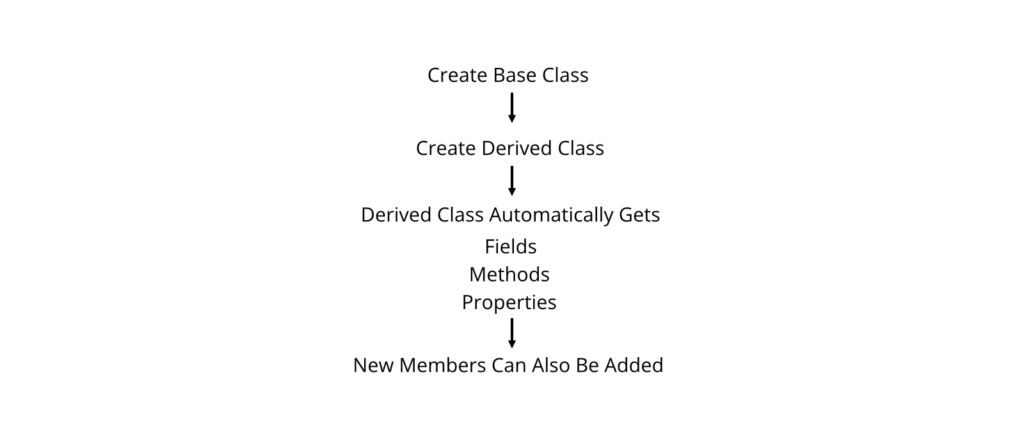
Base Class and Derived Class
Base Class
A Base Class is a class whose members are inherited by another class.
Example
class Person
{
public string Name;
public void Display()
{
Console.WriteLine(Name);
}
}
Derived Class
A Derived Class inherits members from the base class and can also define additional members.
Example
class Student : Person
{
public int Roll;
}
Complete Program: Base and Derived Class
using System;
class Person
{
public string Name;
public void Display()
{
Console.WriteLine(“Name : ” + Name);
}
}
class Student : Person
{
public int Roll;
public void ShowRoll()
{
Console.WriteLine(“Roll : ” + Roll);
}
}
class Program
{
static void Main()
{
Student s = new Student();
s.Name = “Ram”;
s.Roll = 15;
s.Display();
s.ShowRoll();
}
}
Output
Name : Ram
Roll : 15
Explanation
- Person is the base class.
- Student inherits Person.
- Student automatically gets the Name field and Display() method.
- Student adds its own Roll field and ShowRoll() method.
- The object accesses both inherited and its own members.
Memory Representation

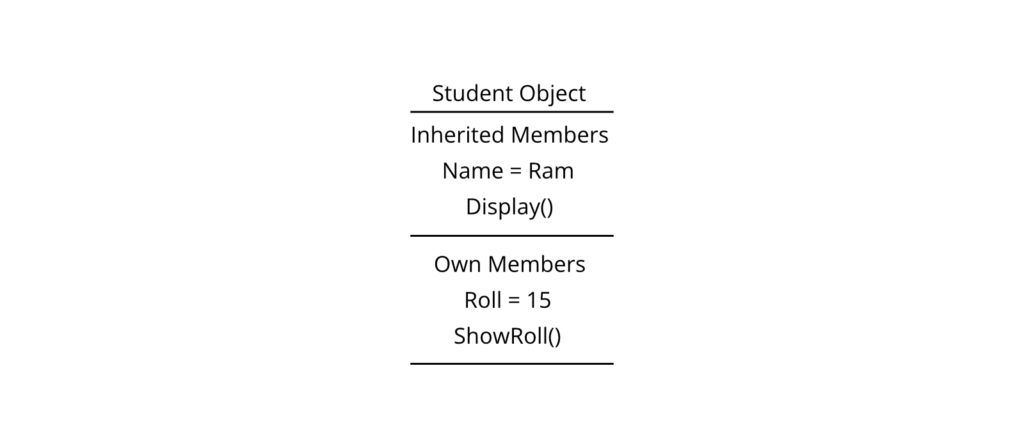
Members Inherited
A derived class can inherit:
- Fields
- Methods
- Properties
- Events
- Indexers
A derived class cannot directly access:
- Private members of the base class.
- Base class constructors (they execute automatically through constructor chaining).
Single Inheritance
Single Inheritance is a type of inheritance in which one derived class inherits from only one base class.
It is the simplest and most commonly used form of inheritance.
Diagram


Syntax
class Person
{
}
class Student : Person
{
}
Complete Program: Single Inheritance
using System;
class Person
{
public void DisplayPerson()
{
Console.WriteLine(“Person Information”);
}
}
class Student : Person
{
public void DisplayStudent()
{
Console.WriteLine(“Student Information”);
}
}
class Program
{
static void Main()
{
Student s = new Student();
s.DisplayPerson();
s.DisplayStudent();
}
}
Output
Person Information
Student Information
Working Principle
- Person is created first.
- Student inherits all accessible members.
- The Student object can call both inherited and own methods.
Real-World Example


Every Student is a Person, but every Person is not necessarily a Student.
This is known as an “is-a” relationship.
Advantages
- Code reuse.
- Easy maintenance.
- Less duplication.
- Simple hierarchy.
- Better organization.
Limitations
- Supports only one parent class.
- Excessive inheritance may increase complexity.
Multilevel Inheritance
Multilevel Inheritance is a type of inheritance in which a class inherits from another derived class, forming a chain of inheritance.
Diagram


Syntax
class Person
{
}
class Student : Person
{
}
class GraduateStudent : Student
{
}
Complete Program
using System;
class Person
{
public void ShowPerson()
{
Console.WriteLine(“Person”);
}
}
class Student : Person
{
public void ShowStudent()
{
Console.WriteLine(“Student”);
}
}
class GraduateStudent : Student
{
public void ShowGraduate()
{
Console.WriteLine(“Graduate Student”);
}
}
class Program
{
static void Main()
{
GraduateStudent g = new GraduateStudent();
g.ShowPerson();
g.ShowStudent();
g.ShowGraduate();
}
}
Output
Person
Student
Graduate Student
Explanation
- GraduateStudent inherits from Student.
- Student inherits from Person.
- Therefore, GraduateStudent can access members from both Student and Person.
Memory Hierarchy

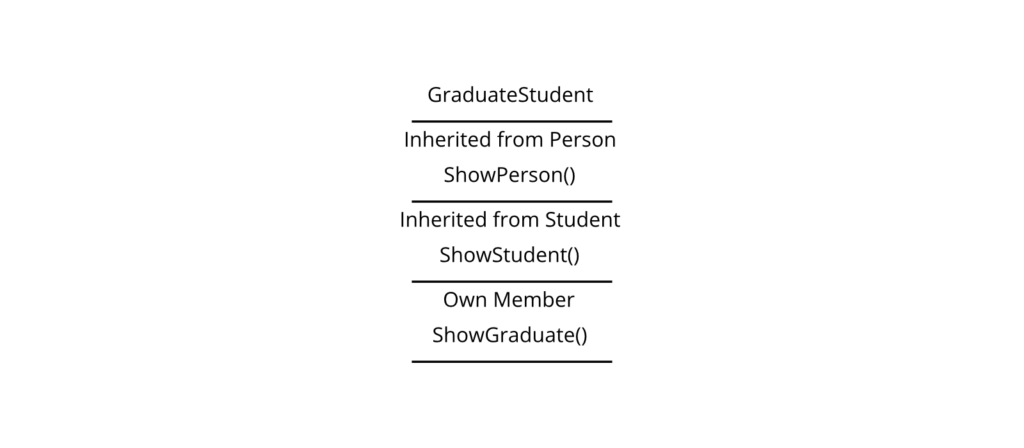
Single vs Multilevel Inheritance
| Feature | Single Inheritance | Multilevel Inheritance |
| Parent Classes | One | Chain of classes |
| Levels | Two | Three or more |
| Complexity | Low | Medium |
| Reusability | Good | Higher |
Real-World Applications
Inheritance is widely used in:
- Student Management Systems
- Banking Applications
- Hospital Management Systems
- Vehicle Management Systems
- Employee Payroll Systems
Example: University Management System
Person
├── Student
├── Teacher
└── Staff
This design avoids duplication of common attributes like Name, Address, and Phone.
Common Student Mistakes
❌ Incorrect
class Student inherits Person
{
}
Reason: C# uses the : operator, not the inherits keyword.
✔ Correct
class Student : Person
{
}
❌ Incorrect
Attempting to access a private base class member:
class Person
{
private int age;
}
class Student : Person
{
public void Show()
{
Console.WriteLine(age);
}
}
Reason: Private members are not directly accessible in derived classes.
✔ Correct
Use a protected member or a public property/method to provide controlled access.
Best Practices
- Model only genuine “is-a” relationships using inheritance.
- Keep base classes focused on common functionality.
- Avoid deep inheritance hierarchies unless necessary.
- Prefer composition when inheritance does not naturally fit.
- Use meaningful class names.
Viva Questions
- What is inheritance?
- What is the difference between a base class and a derived class?
- What is the purpose of inheritance?
- Explain the “is-a” relationship with an example.
- What is single inheritance?
- What is multilevel inheritance?
- Which operator is used to inherit a class in C#?
- Can a derived class access private members of the base class?
Key Points for Exam
- Inheritance enables code reuse and extensibility.
- C# uses the : operator to implement inheritance.
- A derived class inherits accessible members of the base class.
- Single inheritance involves one base and one derived class.
- Multilevel inheritance forms a chain of inheritance.
- Private members of the base class are not directly accessible in the derived class.
Hierarchical Inheritance
Hierarchical Inheritance is a type of inheritance in which multiple derived classes inherit from a single base class.
In this type of inheritance, one parent class provides common properties and methods to several child classes.
Purpose
Hierarchical inheritance is used to:
- Share common functionality among multiple classes.
- Reduce duplicate code.
- Improve maintainability.
- Model real-world relationships.
Why It Is Used
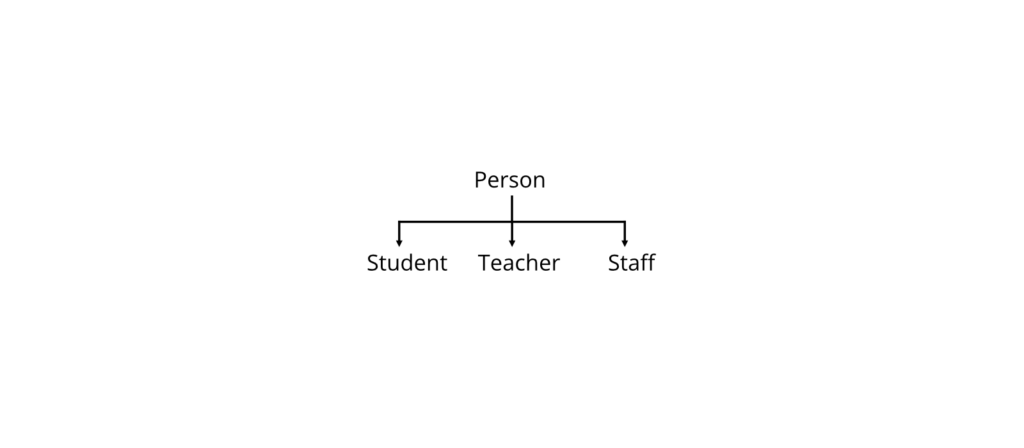
Consider a university system:
- Every Student is a Person.
- Every Teacher is a Person.
- Every Staff member is also a Person.
Instead of writing common information repeatedly, all three classes inherit from the Person class.
Working Principle

Syntax
class Person
{
}
class Student : Person
{
}
class Teacher : Person
{
}
class Staff : Person
{
}
Complete Program
using System;
class Person
{
public void DisplayPerson()
{
Console.WriteLine(“Person Details”);
}
}
class Student : Person
{
public void Study()
{
Console.WriteLine(“Student is studying.”);
}
}
class Teacher : Person
{
public void Teach()
{
Console.WriteLine(“Teacher is teaching.”);
}
}
class Program
{
static void Main()
{
Student s = new Student();
Teacher t = new Teacher();
s.DisplayPerson();
s.Study();
Console.WriteLine();
t.DisplayPerson();
t.Teach();
}
}
Output
Person Details
Student is studying.
Person Details
Teacher is teaching.
Explanation
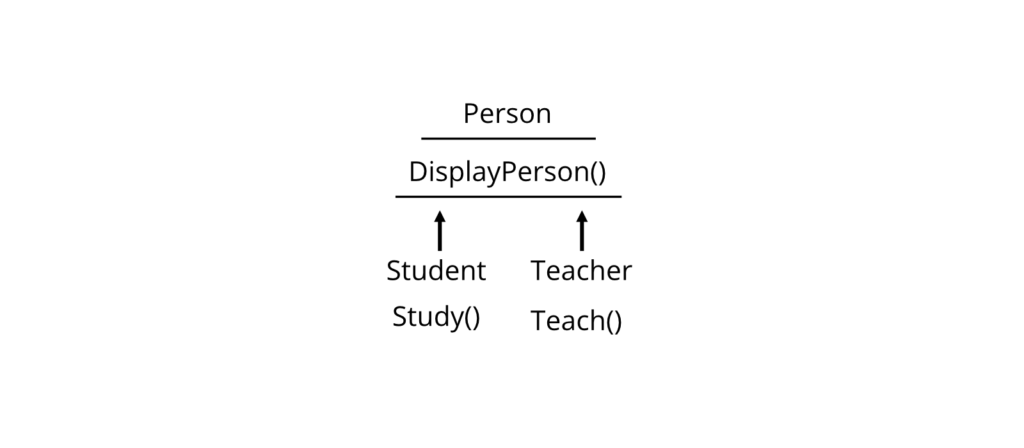
- Student and Teacher inherit the DisplayPerson() method from Person.
- Each derived class also contains its own specific methods.
- This avoids duplication of common code.
Memory Diagram

Advantages
- Reduces code duplication.
- Easy to maintain.
- Supports code reuse.
- Easy to extend.
Limitations
- Changes in the base class affect all derived classes.
- Deep inheritance trees may become difficult to understand.
Multiple Inheritance
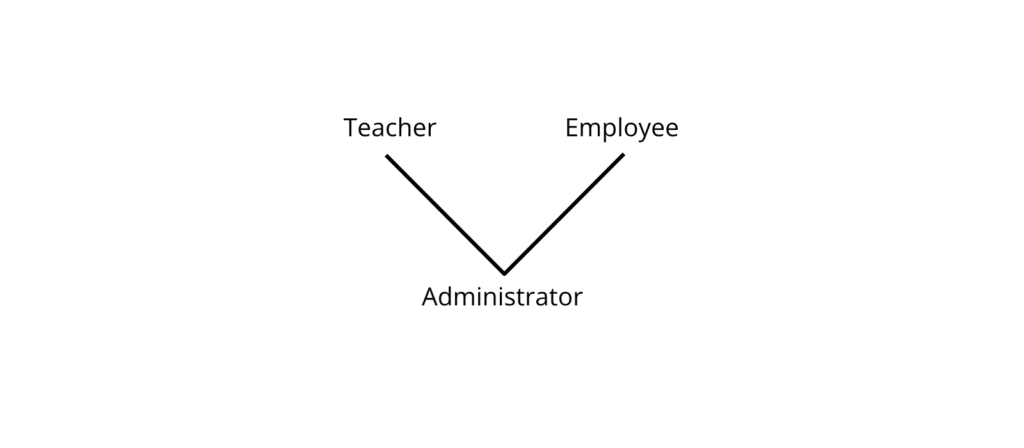
Multiple Inheritance is a type of inheritance in which one class inherits from more than one base class.
Diagram

Does C# Support Multiple Inheritance?
No.
C# does not support multiple inheritance through classes.
The following code is invalid.
class A
{
}
class B
{
}
class C : A, B
{
}
Why Doesn’t C# Support It?
The main reason is to avoid the Diamond Problem.
Diamond Problem

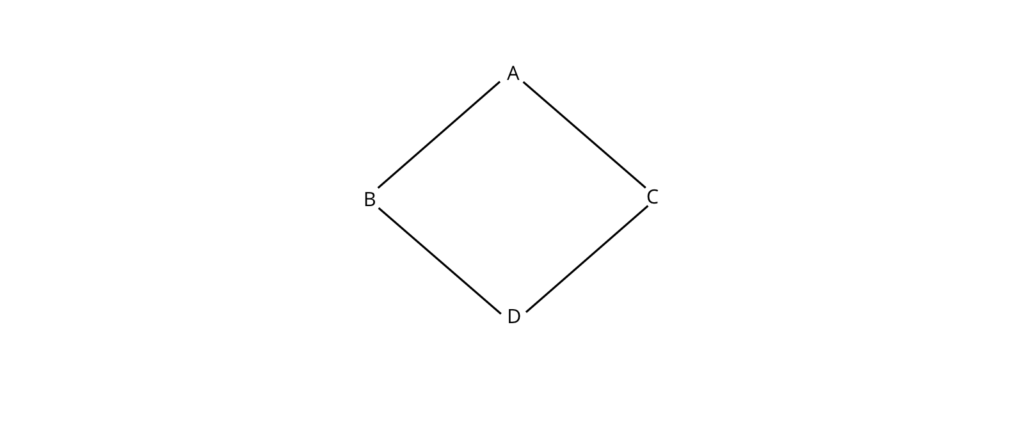
Suppose:
- B overrides a method from A.
- C also overrides the same method.
- D inherits both B and C.
The compiler cannot determine which version should be used.
This ambiguity is called the Diamond Problem.
Alternative in C#
Instead of multiple inheritance through classes, C# uses Interfaces.
Example:
interface ITeacher
{
void Teach();
}
interface IResearcher
{
void Research();
}
class Professor : ITeacher, IResearcher
{
public void Teach()
{
Console.WriteLine(“Teaching…”);
}
public void Research()
{
Console.WriteLine(“Researching…”);
}
}
Output
Teaching…
Researching…
Multiple Inheritance vs Interfaces
| Feature | Multiple Inheritance | Interfaces |
| Supported in C# | ❌ No (Classes) | ✅ Yes |
| Ambiguity | Possible | Avoided |
| Multiple Behaviors | Limited | Supported |
| Recommended | No | Yes |
Hybrid Inheritance
Hybrid Inheritance is a combination of two or more types of inheritance.
Diagram


Hybrid Inheritance in C#
Hybrid inheritance cannot be implemented using classes alone because it would require multiple inheritance.
However, it can be achieved using interfaces.
Example
using System;
interface IPrintable
{
void Print();
}
interface IScannable
{
void Scan();
}
class Printer : IPrintable, IScannable
{
public void Print()
{
Console.WriteLine(“Printing…”);
}
public void Scan()
{
Console.WriteLine(“Scanning…”);
}
}
class Program
{
static void Main()
{
Printer p = new Printer();
p.Print();
p.Scan();
}
}
Output
Printing…
Scanning…
Explanation
- Printer implements two interfaces.
- It behaves like hybrid inheritance without using multiple base classes.
- This approach avoids ambiguity.
Types of Inheritance Summary
| Type | Supported in C# Classes | Supported Using Interfaces |
| Single | ✅ Yes | ✅ Yes |
| Multilevel | ✅ Yes | ✅ Yes |
| Hierarchical | ✅ Yes | ✅ Yes |
| Multiple | ❌ No | ✅ Yes |
| Hybrid | ❌ Directly No | ✅ Yes |
Advantages of Inheritance
- Promotes code reuse.
- Reduces duplication.
- Improves maintainability.
- Simplifies application development.
- Supports polymorphism.
- Models real-world relationships.
- Makes applications easier to extend.
Limitations of Inheritance
- Tight coupling between classes.
- Changes in the base class may affect derived classes.
- Deep inheritance hierarchies increase complexity.
- Not suitable when there is no natural “is-a” relationship.
- Overuse may make debugging difficult.
Real-World Applications
Inheritance is widely used in:
Banking System
Account
├── SavingAccount
├── CurrentAccount
└── LoanAccount
Hospital Management
Person
├── Doctor
├── Nurse
└── Patient
University Management
Person
├── Student
├── Teacher
└── Staff
Vehicle Management
Vehicle
├── Car
├── Bus
└── Bike
Comparison Table
| Type | Number of Parent Classes | Supported in C# Classes |
| Single | 1 | ✅ Yes |
| Multilevel | Chain | ✅ Yes |
| Hierarchical | 1 Parent, Many Children | ✅ Yes |
| Multiple | Many Parents | ❌ No |
| Hybrid | Combination | Via Interfaces |
Common Student Mistakes
❌ Incorrect
class C : A, B
{
}
Reason: Multiple inheritance through classes is not supported in C#.
✔ Correct
class C : A
{
}
interface IX
{
}
interface IY
{
}
class D : IX, IY
{
}
❌ Incorrect
Using inheritance where there is no “is-a” relationship.
Example:
Student inherits Library
Reason: A Student is not a Library.
✔ Correct
Student inherits Person
because a Student is a Person.
Best Practices
- Use inheritance only for true “is-a” relationships.
- Keep base classes general and reusable.
- Avoid unnecessarily deep inheritance hierarchies.
- Prefer interfaces for multiple behaviors.
- Favor composition over inheritance when appropriate.
Viva Questions
- What is hierarchical inheritance?
- Why does C# not support multiple inheritance through classes?
- Explain the Diamond Problem.
- How can multiple inheritance be achieved in C#?
- What is hybrid inheritance?
- Which inheritance types are supported directly by C# classes?
- When should interfaces be preferred over inheritance?
Memory Trick
Remember the order of inheritance types with the mnemonic:
“SMHMH”
- S – Single
- M – Multilevel
- H – Hierarchical
- M – Multiple (Not through classes)
- H – Hybrid (Using interfaces)
Revision Checklist
- ✔ Define inheritance.
- ✔ Differentiate between base class and derived class.
- ✔ Write programs for single, multilevel, and hierarchical inheritance.
- ✔ Explain why multiple inheritance is not supported in C# classes.
- ✔ Draw the Diamond Problem diagram.
- ✔ Explain how interfaces solve multiple inheritance.
- ✔ Compare all inheritance types.
- ✔ Know the advantages and limitations of inheritance.
📘 Examination Tip
These inheritance topics are highly examinable:
- MCQs (1 mark): Types of inheritance, supported inheritance models in C#, Diamond Problem, interfaces.
- Short-answer questions (5 marks): Explain hierarchical inheritance; why C# does not support multiple inheritance through classes; compare inheritance types.
- Long-answer questions (10 marks): Write C# programs demonstrating hierarchical inheritance and explain how interfaces are used to achieve multiple and hybrid inheritance.
- Practical/Laboratory questions: Implement hierarchical inheritance (Person → Student, Teacher) and create a class implementing multiple interfaces.
- Viva questions: Be prepared to explain the Diamond Problem, justify the use of interfaces instead of multiple inheritance, and identify appropriate real-world scenarios for each inheritance type.
Abstract Classes and Methods
An Abstract Class is a special type of class that cannot be instantiated (cannot create objects) and is designed to be inherited by other classes.
An abstract class acts as a blueprint for derived classes. It can contain both abstract methods (without implementation) and non-abstract methods (with implementation).
Purpose
Abstract classes are used to:
- Define a common base for related classes.
- Force derived classes to implement specific methods.
- Promote code reuse.
- Support abstraction in Object-Oriented Programming (OOP).
Why It Is Used
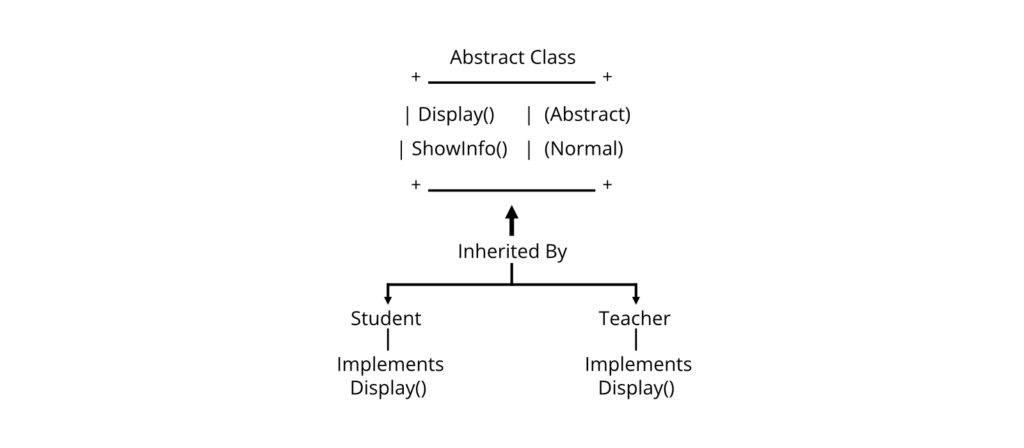
Consider a university management system where all people (students, teachers, staff) have a Display() method, but each displays different information.
An abstract class can define the common structure while allowing derived classes to provide their own implementation.
Working Principle

Characteristics
- Declared using the abstract keyword.
- Cannot create objects directly.
- May contain abstract and normal methods.
- Derived classes must implement all abstract methods unless they are also abstract.
- Supports inheritance and polymorphism.
Syntax
abstract class ClassName
{
public abstract void MethodName();
public void NormalMethod()
{
}
}
Abstract Method
An Abstract Method is a method declared without a body. It must be implemented by the derived class using the override keyword.
Syntax
public abstract void Display();
Complete Program
using System;
abstract class Person
{
public abstract void Display();
public void ShowMessage()
{
Console.WriteLine(“Welcome to the University”);
}
}
class Student : Person
{
public override void Display()
{
Console.WriteLine(“Student Details”);
}
}
class Program
{
static void Main()
{
Student s = new Student();
s.ShowMessage();
s.Display();
}
}
Output
Welcome to the University
Student Details
Explanation
- Person is an abstract class.
- It contains an abstract method Display().
- Student inherits from Person.
- Student overrides the Display() method.
- The inherited normal method and overridden method are both executed.
Example: Multiple Derived Classes
using System;
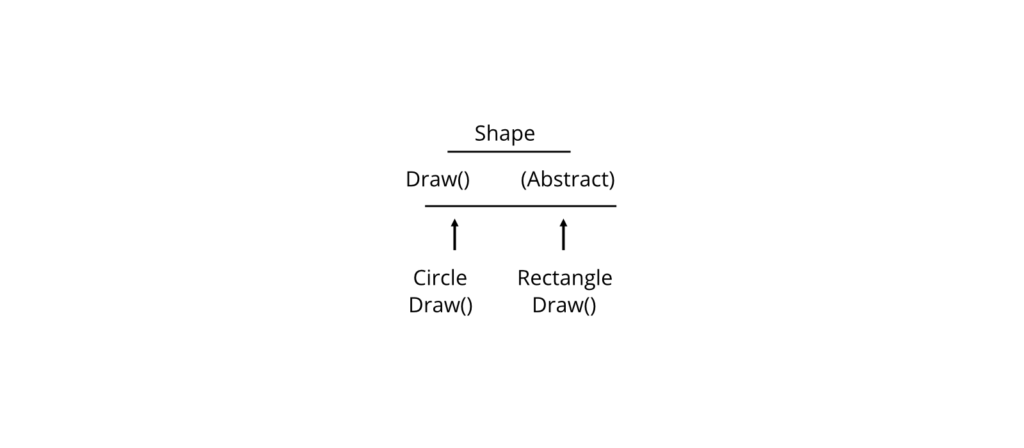
abstract class Shape
{
public abstract void Draw();
}
class Circle : Shape
{
public override void Draw()
{
Console.WriteLine(“Drawing Circle”);
}
}
class Rectangle : Shape
{
public override void Draw()
{
Console.WriteLine(“Drawing Rectangle”);
}
}
class Program
{
static void Main()
{
Shape s1 = new Circle();
Shape s2 = new Rectangle();
s1.Draw();
s2.Draw();
}
}
Output
Drawing Circle
Drawing Rectangle
Memory Diagram

Abstract Class vs Normal Class
| Feature | Abstract Class | Normal Class |
| Object Creation | Not Allowed | Allowed |
| Abstract Methods | Yes | No |
| Normal Methods | Yes | Yes |
| Constructor | Allowed | Allowed |
| Purpose | Base Blueprint | General Class |
Abstract Class vs Interface
| Feature | Abstract Class | Interface |
| Fields | Yes | No (except constants) |
| Constructors | Yes | No |
| Method Implementation | Yes | Default implementations are possible in modern C#, but traditionally no |
| Multiple Inheritance | No | Yes |
Exam Note: For many university syllabi based on C# 7/.NET Framework, interfaces are generally taught as containing method declarations without implementations.
Advantages
- Promotes abstraction.
- Reduces duplicate code.
- Supports runtime polymorphism.
- Defines a common structure.
- Improves maintainability.
Limitations
- Objects cannot be created directly.
- Supports only single inheritance through classes.
- Derived classes must implement abstract members.
Real-World Applications
Abstract classes are used in:
- Banking systems (Account)
- Hospital management (Person)
- Graphics software (Shape)
- Vehicle management (Vehicle)
- Payment systems (PaymentMethod)
Common Student Mistakes
❌ Incorrect
Person p = new Person();
Reason: Objects of abstract classes cannot be created.
✔ Correct
Person p = new Student();
❌ Incorrect
class Student : Person
{
}
Reason: The abstract method is not implemented.
✔ Correct
class Student : Person
{
public override void Display()
{
Console.WriteLine(“Student”);
}
}
Best Practices
- Use abstract classes when several related classes share common behavior.
- Keep abstract methods focused on essential behavior.
- Do not make every class abstract unnecessarily.
- Place shared code in non-abstract methods.
Viva Questions
- What is an abstract class?
- Can an abstract class have constructors?
- Can an abstract class contain normal methods?
- What is an abstract method?
- Why can’t objects of abstract classes be created?
Key Points for Exam
- Abstract classes cannot be instantiated.
- Abstract methods have no implementation.
- Derived classes must override abstract methods.
- Abstract classes may contain both abstract and normal methods.
base Keyword
The base keyword is used to access members (fields, methods, properties, or constructors) of the immediate base class from a derived class.
It helps distinguish between members of the base class and members of the derived class.
Purpose
The base keyword is used to:
- Access hidden base class members.
- Call a base class constructor.
- Invoke overridden base class methods.
- Reuse functionality defined in the base class.
Why It Is Used
Suppose a derived class overrides a method but still needs to execute the original implementation from the base class. The base keyword allows access to that implementation.
Working Principle


Syntax
Accessing a Base Class Method
base.MethodName();
Accessing a Base Class Constructor
class Student : Person
{
public Student() : base()
{
}
}
Example 1: Calling a Base Class Method
using System;
class Person
{
public void Display()
{
Console.WriteLine(“Person Information”);
}
}
class Student : Person
{
public void Show()
{
base.Display();
Console.WriteLine(“Student Information”);
}
}
class Program
{
static void Main()
{
Student s = new Student();
s.Show();
}
}
Output
Person Information
Student Information
Explanation
- base.Display() executes the method from the base class.
- The derived class then executes its own code.
Example 2: Calling a Base Class Constructor
using System;
class Person
{
public Person(string name)
{
Console.WriteLine(“Name : ” + name);
}
}
class Student : Person
{
public Student(string name, int roll)
: base(name)
{
Console.WriteLine(“Roll : ” + roll);
}
}
class Program
{
static void Main()
{
Student s = new Student(“Ram”, 10);
}
}
Output
Name : Ram
Roll : 10
Constructor Execution Flow

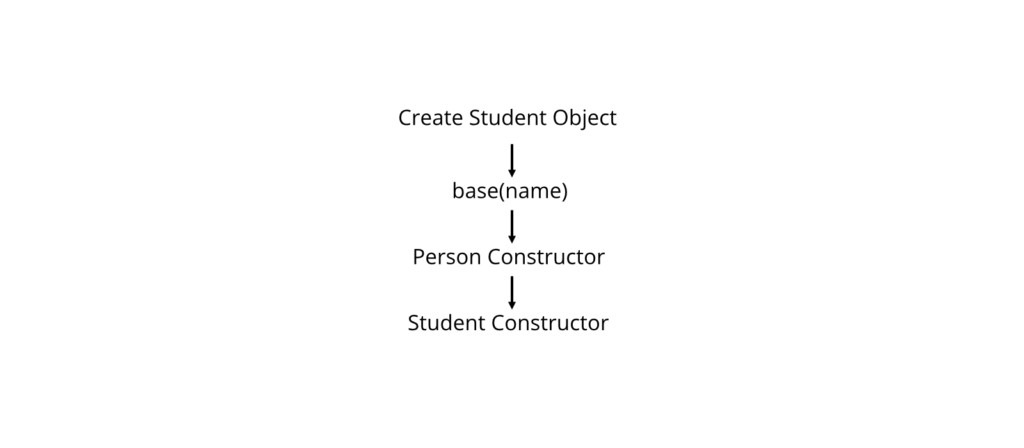
Example 3: Accessing a Hidden Base Member
using System;
class Person
{
public string Name = “Person”;
}
class Student : Person
{
public new string Name = “Student”;
public void Show()
{
Console.WriteLine(base.Name);
Console.WriteLine(Name);
}
}
class Program
{
static void Main()
{
Student s = new Student();
s.Show();
}
}
Output
Person
Student
this vs base
| Feature | this | base |
| Refers To | Current object | Immediate base class |
| Constructor Chaining | Yes | Yes |
| Access Current Members | Yes | No |
| Access Base Members | No | Yes |
Advantages
- Reuses base class functionality.
- Avoids duplicate code.
- Simplifies constructor chaining.
- Improves readability.
Limitations
- Can access only the immediate base class.
- Cannot access private base class members directly.
- Overusing base may indicate poor class design.
Real-World Applications
The base keyword is commonly used in:
- Banking systems (Account → SavingsAccount)
- Employee management (Person → Employee)
- Vehicle management (Vehicle → Car)
- Educational systems (Person → Student)
Common Student Mistakes
❌ Incorrect
base.Name = “Ram”;
when Name is private in the base class.
Reason: Private members are not accessible in derived classes.
✔ Correct
Use a protected field or a public property.
❌ Incorrect
Student() : base
{
}
Reason: Parentheses are required when calling a constructor.
✔ Correct
Student() : base()
{
}
Best Practices
- Use base when you intentionally need base class behavior.
- Prefer calling base constructors to initialize inherited data.
- Avoid hiding base members unless necessary.
- Keep inheritance hierarchies simple.
Viva Questions
- What is the base keyword?
- How is base different from this?
- Can base call constructors?
- Why is base.Display() used?
- Can base access private members?
Key Points for Exam
- base refers to the immediate base class.
- It is used to call base methods and constructors.
- base cannot access private members directly.
- base and this have different purposes.
📘 Examination Tip
These topics are commonly tested:
- MCQs (1 mark): Characteristics of abstract classes, abstract methods, base keyword, differences between this and base.
- Short-answer questions (5 marks): Explain abstract classes with examples; describe the purpose of the base keyword.
- Long-answer questions (10 marks): Write complete C# programs demonstrating an abstract class with derived classes and another program showing constructor chaining and method calls using base.
- Practical/Laboratory questions: Implement an abstract class with overridden methods and create a derived class that calls a base class constructor and method.
- Viva questions: Be prepared to explain why abstract classes cannot be instantiated, when to use abstract classes instead of interfaces, how base differs from this, and why base constructors are used.
Method Overloading
Method Overloading is a feature of C# that allows multiple methods in the same class to have the same name but different parameter lists.
The compiler distinguishes overloaded methods based on the number, type, or order of parameters. Method overloading is an example of compile-time polymorphism (static polymorphism).
Purpose
Method overloading is used to:
- Improve code readability.
- Perform similar operations using the same method name.
- Increase code reusability.
- Reduce the need to remember multiple method names.
Why It Is Used
Suppose a calculator application needs to add:
- Two integers
- Three integers
- Two decimal numbers
Instead of creating methods like AddInt(), AddThreeInt(), and AddDouble(), we can use the same method name Add() with different parameter lists.
Working Principle

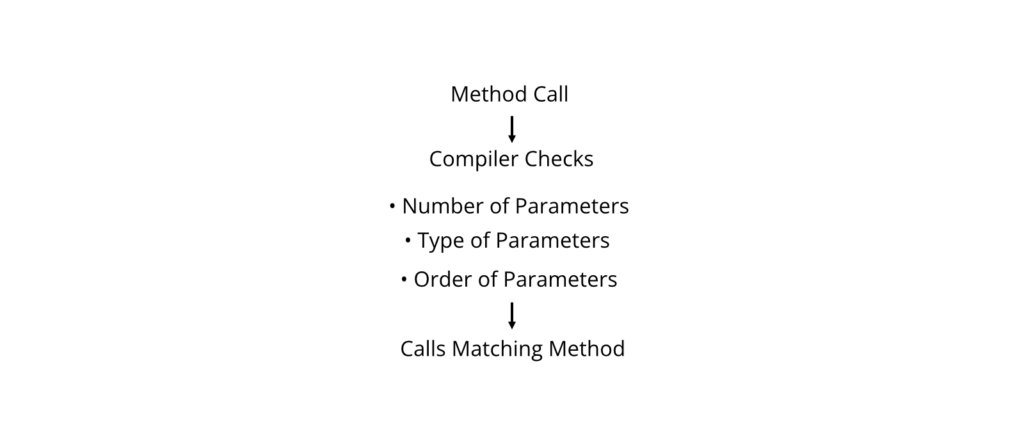
Rules for Method Overloading
Methods can be overloaded by changing:
- Number of parameters
- Data type of parameters
- Order of parameters
Methods cannot be overloaded by changing only:
- Return type
- Method body
- Parameter names
Syntax
class ClassName
{
ReturnType MethodName(Parameter1)
{
}
ReturnType MethodName(Parameter1, Parameter2)
{
}
ReturnType MethodName(ParameterType1, ParameterType2)
{
}
}
Example 1: Overloading by Number of Parameters
using System;
class Calculator
{
public int Add(int a, int b)
{
return a + b;
}
public int Add(int a, int b, int c)
{
return a + b + c;
}
}
class Program
{
static void Main()
{
Calculator obj = new Calculator();
Console.WriteLine(obj.Add(10, 20));
Console.WriteLine(obj.Add(10, 20, 30));
}
}
Output
30
60
Explanation
- The compiler calls the first method when two arguments are supplied.
- The second method is called when three arguments are supplied.
Example 2: Overloading by Data Type
using System;
class Calculator
{
public int Multiply(int a, int b)
{
return a * b;
}
public double Multiply(double a, double b)
{
return a * b;
}
}
class Program
{
static void Main()
{
Calculator obj = new Calculator();
Console.WriteLine(obj.Multiply(5, 6));
Console.WriteLine(obj.Multiply(2.5, 4.0));
}
}
Output
30
10
Example 3: Overloading by Order of Parameters
using System;
class Demo
{
public void Display(int number, string name)
{
Console.WriteLine(number + ” ” + name);
}
public void Display(string name, int number)
{
Console.WriteLine(name + ” ” + number);
}
}
class Program
{
static void Main()
{
Demo d = new Demo();
d.Display(1, “Ram”);
d.Display(“Hari”, 2);
}
}
Output
1 Ram
Hari 2
Execution Flow


Invalid Overloading Example
class Test
{
public int Show()
{
return 10;
}
public double Show()
{
return 20;
}
}
Why is this invalid?
The compiler considers only the parameter list, not the return type. Therefore, these methods have identical signatures and cause a compilation error.
Method Overloading vs Method Overriding
| Feature | Method Overloading | Method Overriding |
| Polymorphism | Compile-time | Runtime |
| Class | Same class | Base and derived classes |
| Parameters | Different | Same |
| Return Type | Usually same (cannot differ alone) | Same or compatible |
| Keywords | None required | virtual and override |
Real-World Applications
Method overloading is used in:
- Calculator applications
- Banking software
- Scientific calculations
- Graphics applications
- Utility libraries
Advantages
- Improves readability.
- Makes APIs easier to use.
- Promotes code reuse.
- Reduces method names.
Limitations
- Excessive overloading can confuse developers.
- Similar parameter lists may lead to ambiguity.
- Poor design reduces maintainability.
Common Student Mistakes
❌ Incorrect
public int Sum(int a)
{
return a;
}
public double Sum(int a)
{
return a;
}
Reason: Only the return type is different, which is not allowed.
✔ Correct
public int Sum(int a)
{
return a;
}
public int Sum(int a, int b)
{
return a + b;
}
Best Practices
- Overload methods only when they perform related tasks.
- Keep parameter lists simple.
- Avoid creating ambiguous overloads.
- Use meaningful documentation for overloaded methods.
Viva Questions
- What is method overloading?
- Is method overloading compile-time or runtime polymorphism?
- Can methods be overloaded using only different return types?
- What are the rules for method overloading?
- Differentiate method overloading and method overriding.
Key Points for Exam
- Method overloading supports compile-time polymorphism.
- Overloaded methods must differ in parameter lists.
- Return type alone cannot overload a method.
- Overloading improves code readability and reuse.
Object Type
Object is the ultimate base class of all types in C#. Every class, struct, interface, array, delegate, and built-in type ultimately derives from System.Object.
Because every type inherits from Object, an Object reference can store a value of any type.
Purpose
The Object type is used to:
- Provide a common base for all types.
- Enable universal storage of values.
- Support boxing and unboxing.
- Offer common methods such as ToString(), Equals(), and GetHashCode().
Why It Is Used
Sometimes an application needs to store different types of data in a single collection or variable. Since every type derives from Object, this is possible.
Working Principle

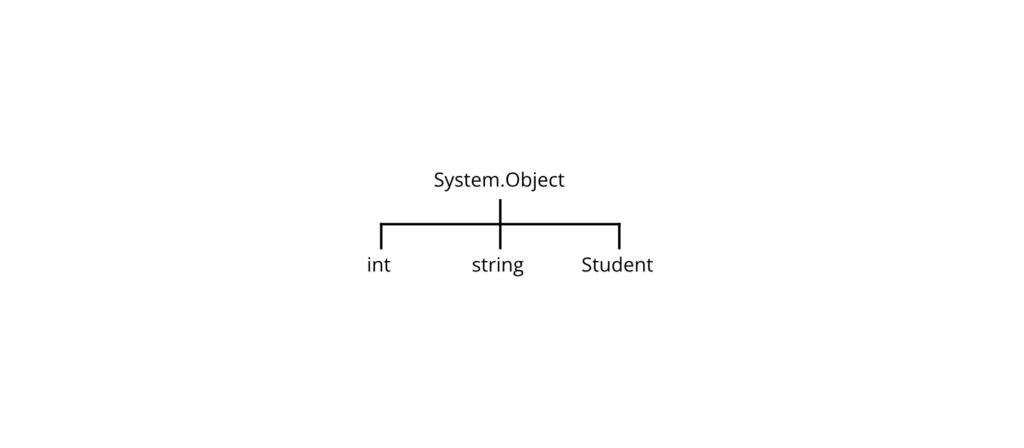
Common Methods of Object
| Method | Purpose |
| ToString() | Returns string representation |
| Equals() | Compares objects |
| GetHashCode() | Returns hash code |
| GetType() | Returns runtime type |
| ReferenceEquals() | Checks reference equality (static method) |
Syntax
object variable;
Example 1: Storing Different Types
using System;
class Program
{
static void Main()
{
object value;
value = 100;
Console.WriteLine(value);
value = “Hello”;
Console.WriteLine(value);
value = 3.14;
Console.WriteLine(value);
}
}
Output
100
Hello
3.14
Explanation
The same object variable stores:
- Integer
- String
- Double
because every type inherits from System.Object.
Example 2: Using GetType()
using System;
class Program
{
static void Main()
{
object value = 100;
Console.WriteLine(value.GetType());
value = “DotNet”;
Console.WriteLine(value.GetType());
}
}
Output
System.Int32
System.String
Example 3: Boxing and Unboxing
using System;
class Program
{
static void Main()
{
int number = 50;
object obj = number; // Boxing
int result = (int)obj; // Unboxing
Console.WriteLine(result);
}
}
Output
50
Boxing and Unboxing Diagram


Object vs dynamic
| Feature | object | dynamic |
| Type Checking | Compile time | Runtime |
| Casting Required | Yes | Usually No |
| Performance | Better | Slightly Slower |
| Error Detection | Compile-time | Runtime |
Advantages
- Common base for all types.
- Supports generic programming.
- Useful for heterogeneous collections.
- Provides useful built-in methods.
Limitations
- Boxing/unboxing may reduce performance.
- Explicit casting is required when retrieving value types.
- Incorrect casting can cause runtime exceptions.
Real-World Applications
The Object type is commonly used in:
- Generic collections (legacy APIs)
- Event handling
- Reflection
- Framework libraries
- Serialization
Common Student Mistakes
❌ Incorrect
object obj = 10;
int x = obj;
Reason: An explicit cast is required during unboxing.
✔ Correct
object obj = 10;
int x = (int)obj;
Best Practices
- Use object only when storing values of different types is necessary.
- Prefer generics for type-safe collections.
- Minimize unnecessary boxing and unboxing.
- Cast carefully to avoid runtime exceptions.
Viva Questions
- What is System.Object?
- Why is Object called the root of all classes?
- What are boxing and unboxing?
- Name four common methods of Object.
- Differentiate object and dynamic.
Key Points for Exam
- System.Object is the root of the C# type hierarchy.
- Every type in C# inherits from Object.
- ToString(), Equals(), GetType(), and GetHashCode() are commonly used methods.
- Boxing converts a value type to object; unboxing converts it back with an explicit cast.
📘Examination Tip
These topics are frequently examined:
- MCQs (1 mark): Rules of method overloading, root class of C#, boxing vs unboxing, common methods of System.Object.
- Short-answer questions (5 marks): Explain method overloading with an example; describe the Object type and its methods.
- Long-answer questions (10 marks): Write C# programs demonstrating method overloading (different parameters) and explain boxing/unboxing with suitable examples.
- Practical/Laboratory questions: Implement overloaded methods in a calculator class and demonstrate storing different data types in an object variable with type checking using GetType().
- Viva questions: Be prepared to explain why return type alone cannot overload a method, the difference between overloading and overriding, the significance of System.Object, and the concepts of boxing and unboxing.
Structs
A Struct (Structure) is a user-defined value type in C# that groups related data members and methods into a single unit.
Unlike classes, structs are value types, meaning they are stored directly (typically on the stack when used as local variables, though actual storage depends on context) and copied by value when assigned.
Structs are suitable for representing small, lightweight objects such as coordinates, points, dates, colors, and measurements.
Purpose
Structs are used to:
- Group related data together.
- Represent small data objects efficiently.
- Reduce memory overhead for lightweight data.
- Improve program organization.
Why It Is Used
Suppose we need to represent the position of a student on a classroom seating chart.
Instead of storing separate variables:
Row = 5
Column = 8
we can create a structure named SeatPosition.
SeatPosition
————-
Row
Column
————-
This makes the program more organized.
Working Principle


Characteristics of Structs
- Declared using the struct keyword.
- Value type.
- Can contain:
- Fields
- Properties
- Methods
- Constructors
- Indexers
- Can implement interfaces.
- Can be instantiated without using new only after all fields are assigned.
- Cannot inherit from another class or struct.
- Implicitly inherits from System.ValueType.
Syntax
struct StructName
{
// Fields
// Properties
// Methods
}
Example 1: Simple Structure
using System;
struct Student
{
public int Roll;
public string Name;
}
class Program
{
static void Main()
{
Student s;
s.Roll = 10;
s.Name = “Ram”;
Console.WriteLine(“Roll : ” + s.Roll);
Console.WriteLine(“Name : ” + s.Name);
}
}
Output
Roll : 10
Name : Ram
Explanation
- Student is a structure.
- Roll and Name are fields.
- The structure variable stores both values together.
Example 2: Structure with Constructor
using System;
struct Rectangle
{
public int Length;
public int Width;
public Rectangle(int l, int w)
{
Length = l;
Width = w;
}
public int Area()
{
return Length * Width;
}
}
class Program
{
static void Main()
{
Rectangle r = new Rectangle(10, 5);
Console.WriteLine(“Area = ” + r.Area());
}
}
Output
Area = 50
Explanation
- The constructor initializes the structure.
- The Area() method calculates the rectangle’s area.
Example 3: Array of Structures
using System;
struct Student
{
public int Roll;
public string Name;
}
class Program
{
static void Main()
{
Student[] students = new Student[2];
students[0].Roll = 1;
students[0].Name = “Ram”;
students[1].Roll = 2;
students[1].Name = “Sita”;
foreach (Student s in students)
{
Console.WriteLine(s.Roll + ” ” + s.Name);
}
}
}
Output
1 Ram
2 Sita
Memory Representation

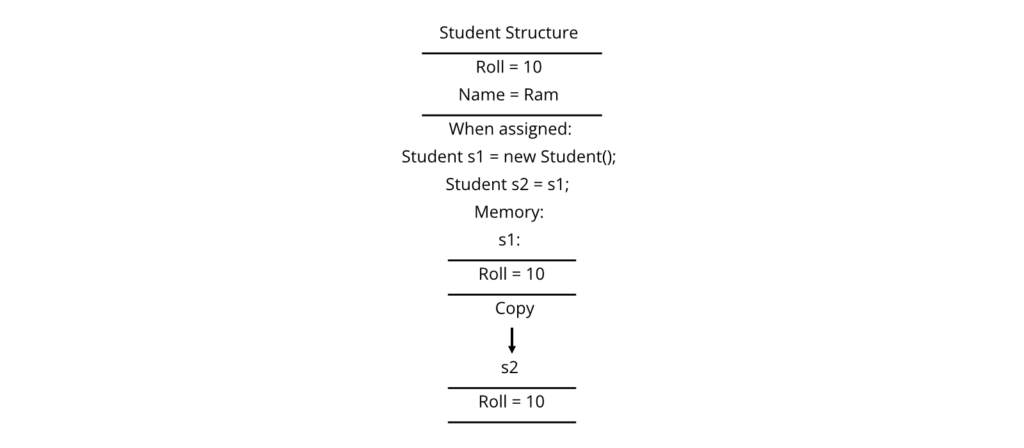
Changing s2 does not affect s1 because structs are copied by value.
Structure vs Class
| Feature | Struct | Class |
| Type | Value Type | Reference Type |
| Memory | Copied by value | Reference copied |
| Inheritance | Cannot inherit from classes/structs | Supports inheritance |
| Default Base Type | System.ValueType | System.Object |
| Suitable For | Small data | Complex objects |
| Performance | Efficient for small values | Better for large, shared objects |
Struct vs Class Diagram

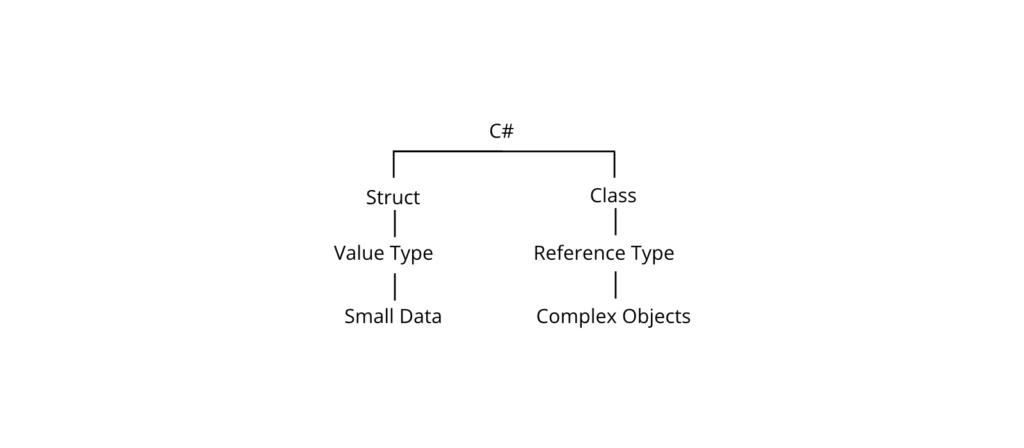
Passing Struct to Methods
By default, structs are passed by value.
using System;
struct Number
{
public int Value;
}
class Program
{
static void Change(Number n)
{
n.Value = 100;
}
static void Main()
{
Number num;
num.Value = 50;
Change(num);
Console.WriteLine(num.Value);
}
}
Output
50
Explanation
The Change() method receives a copy of the structure. Therefore, the original value remains unchanged.
Passing Struct by Reference
using System;
struct Number
{
public int Value;
}
class Program
{
static void Change(ref Number n)
{
n.Value = 100;
}
static void Main()
{
Number num;
num.Value = 50;
Change(ref num);
Console.WriteLine(num.Value);
}
}
Output
100
Real-World Applications
Structs are commonly used in:
- 2D and 3D game development (Point, Vector, Color)
- Graphics programming
- Geographic coordinates (Latitude, Longitude)
- Date and time values
- Financial values (currency, tax rate)
- Scientific measurements
Example: Coordinate System


Advantages
- Efficient for small objects.
- Faster allocation for many scenarios involving local variables.
- Less memory overhead than reference types.
- Values are copied independently.
- Groups related data into one unit.
Limitations
- Cannot inherit from another class or struct.
- Not suitable for large objects because copying can be expensive.
- Frequent copying may affect performance.
- Value semantics may be undesirable when shared state is needed.
Common Student Mistakes
❌ Incorrect
struct Student : Person
{
}
Reason: Structs cannot inherit from classes.
✔ Correct
struct Student
{
}
or implement interfaces if required.
❌ Incorrect
Student s;
Console.WriteLine(s.Roll);
Reason: Local struct variables must have all fields assigned before use.
✔ Correct
Student s;
s.Roll = 1;
s.Name = “Ram”;
Console.WriteLine(s.Roll);
Best Practices
- Use structs only for small, immutable-like data where appropriate.
- Prefer classes for large or complex objects.
- Avoid storing excessive data inside a struct.
- Consider making structs immutable when possible.
- Use meaningful field and property names.
Viva Questions
- What is a struct?
- Is a struct a value type or reference type?
- Can a struct inherit from a class?
- What is the default base type of a struct?
- When should you use a struct instead of a class?
- What happens when one struct is assigned to another?
- Can a struct contain methods and constructors?
Revision Checklist
- ✔ Define a struct.
- ✔ Understand value type behavior.
- ✔ Write a structure declaration.
- ✔ Create and initialize structure variables.
- ✔ Compare structs and classes.
- ✔ Explain value copying.
- ✔ Understand passing structs by value and by reference.
- ✔ Know common real-world applications.
Key Points for Exam
- A struct is a value type declared using the struct keyword.
- Structs inherit from System.ValueType.
- Structs can contain fields, methods, properties, and constructors.
- Structs cannot inherit from classes or other structs.
- Assignment copies the entire value.
- Use structs for small, lightweight data objects.
📘 Examination Tip
The following questions are frequently asked on structs:
- MCQs (1 mark): Struct keyword, value type vs reference type, default base type (System.ValueType), inheritance restrictions.
- Short-answer questions (5 marks): Define a struct; compare structs and classes; explain value-type behavior.
- Long-answer questions (10 marks): Write a C# program demonstrating a struct with fields, constructors, and methods, and explain how assignment and parameter passing work.
- Practical/Laboratory questions: Create a Student, Rectangle, or Point struct, demonstrate copying by value, and modify it using both pass-by-value and ref.
- Viva questions: Be prepared to explain when a struct should be preferred over a class, why structs are value types, and why they cannot inherit from classes.
Access Modifiers
Access Modifiers are C# keywords that control the visibility and accessibility of classes, methods, properties, fields, constructors, and other members.
They help protect data by allowing only authorized code to access specific members, supporting the principle of encapsulation in Object-Oriented Programming (OOP).
Purpose
Access modifiers are used to:
- Control access to class members.
- Protect sensitive data.
- Implement encapsulation.
- Improve program security and maintainability.
Why It Is Used
Suppose a banking application has an Account class. The account balance should not be modified directly by users. Instead, access should be controlled through methods such as Deposit() and Withdraw().
Working Principle

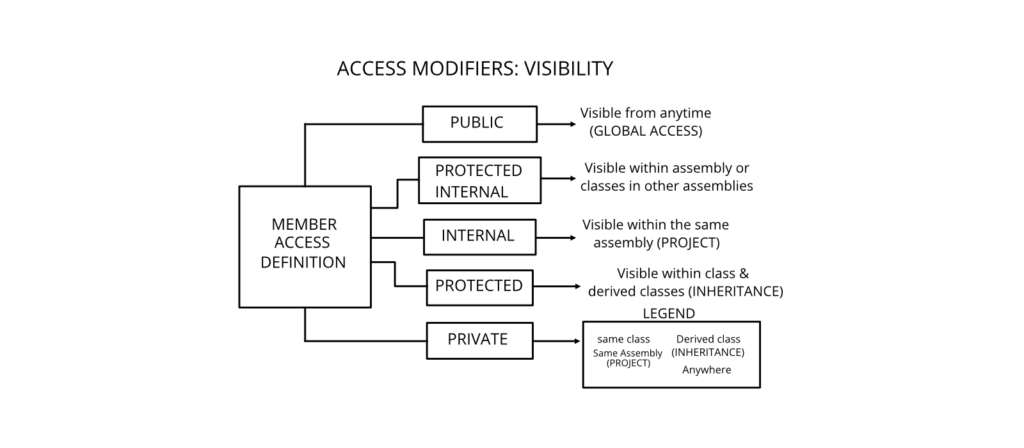
- Controls who can access a member
Types of Access Modifiers
| Modifier | Accessible Within Class | Derived Class | Same Assembly | Other Assembly |
| private | ✅ | ❌ | ❌ | ❌ |
| protected | ✅ | ✅ | ❌* | ❌ |
| internal | ✅ | ✅ | ✅ | ❌ |
| protected internal | ✅ | ✅ | ✅ | ✅ (derived classes) |
| public | ✅ | ✅ | ✅ | ✅ |
*Only through inheritance.
1. Private
private members are accessible only within the class where they are declared.
Syntax
private int age;
Example
using System;
class Student
{
private int marks = 90;
public void Display()
{
Console.WriteLine(“Marks: ” + marks);
}
}
class Program
{
static void Main()
{
Student s = new Student();
s.Display();
// s.marks = 100; // Error
}
}
Output
Marks: 90
Explanation
The marks field is private and cannot be accessed directly outside the Student class.
2. Public
public members are accessible from anywhere in the program.
Example
using System;
class Student
{
public string Name = “Ram”;
}
class Program
{
static void Main()
{
Student s = new Student();
Console.WriteLine(s.Name);
}
}
Output
Ram
3. Protected
protected members are accessible within the same class and by derived classes.
Example
using System;
class Person
{
protected string Name = “Hari”;
}
class Student : Person
{
public void Show()
{
Console.WriteLine(Name);
}
}
class Program
{
static void Main()
{
Student s = new Student();
s.Show();
}
}
Output
Hari
4. Internal
internal members are accessible only within the same assembly (project).
Syntax
internal class Student
{
}
Example Scenario


5. Protected Internal
protected internal members are accessible either from derived classes or from any code within the same assembly.
Syntax
protected internal int Roll;
Access Modifier Hierarchy


Comparison Table
| Modifier | Same Class | Derived Class | Same Project | Outside Project |
| private | ✅ | ❌ | ❌ | ❌ |
| protected | ✅ | ✅ | ❌* | ❌ |
| internal | ✅ | ✅ | ✅ | ❌ |
| protected internal | ✅ | ✅ | ✅ | ✅ (derived) |
| public | ✅ | ✅ | ✅ | ✅ |
Real-World Applications
| Scenario | Modifier |
| Account Balance | private |
| Student Name | public |
| Base Class Member | protected |
| Internal Library Classes | internal |
| Shared Framework Components | protected internal |
Advantages
- Protects data.
- Prevents unauthorized access.
- Supports encapsulation.
- Makes programs more secure.
- Improves maintainability.
Common Student Mistakes
❌ Incorrect
class Student
{
private int marks = 80;
}
Student s = new Student();
Console.WriteLine(s.marks);
Reason: Private members cannot be accessed outside their class.
✔ Correct
class Student
{
private int marks = 80;
public int GetMarks()
{
return marks;
}
}
Best Practices
- Use private by default unless wider access is required.
- Expose data through properties or methods instead of public fields.
- Use protected only for members intended for derived classes.
- Avoid making everything public.
Viva Questions
- What is an access modifier?
- Name the access modifiers in C#.
- What is the difference between private and public?
- When should protected be used?
- What is the purpose of internal?
Key Points for Exam
- Access modifiers control visibility.
- private provides the highest level of protection.
- public allows unrestricted access.
- protected supports inheritance.
- internal limits access to the same assembly.
Interfaces
An Interface is a reference type in C# that defines a contract containing member declarations that implementing classes must provide.
An interface specifies what a class must do, not how it should do it.
Purpose
Interfaces are used to:
- Achieve abstraction.
- Support multiple inheritance of behavior.
- Define common functionality.
- Promote loose coupling between components.
Why It Is Used
Suppose different payment methods—Credit Card, Mobile Wallet, and Bank Transfer—all process payments differently. An interface ensures that every payment class provides a Pay() method.
Working Principle

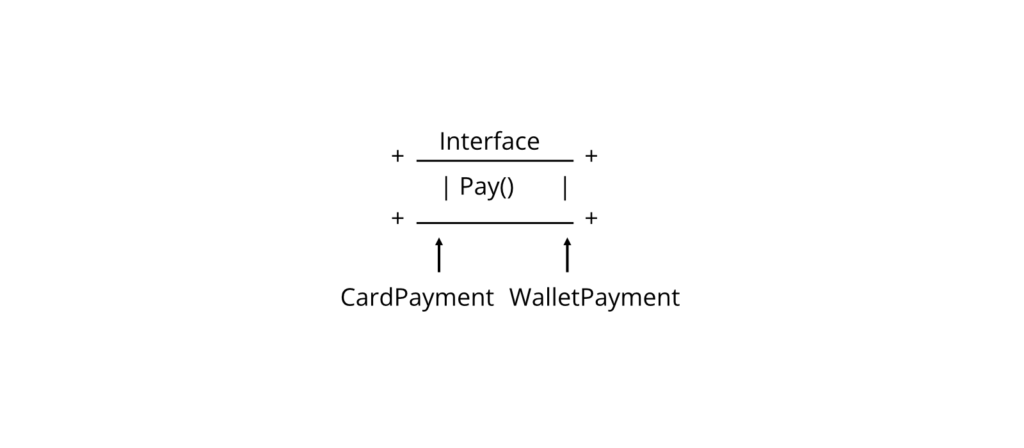
Characteristics
- Declared using the interface keyword.
- Cannot be instantiated.
- A class can implement multiple interfaces.
- Members must be implemented unless the class is abstract.
- Interfaces support abstraction and polymorphism.
Syntax
interface IShape
{
void Draw();
}
class Circle : IShape
{
public void Draw()
{
}
}
Example 1: Basic Interface
using System;
interface IAnimal
{
void Sound();
}
class Dog : IAnimal
{
public void Sound()
{
Console.WriteLine(“Dog Barks”);
}
}
class Program
{
static void Main()
{
Dog d = new Dog();
d.Sound();
}
}
Output
Dog Barks
Explanation
- IAnimal declares the Sound() method.
- Dog implements the interface.
- The implementation is provided in the Dog class.
Example 2: Multiple Interfaces
using System;
interface IPrinter
{
void Print();
}
interface IScanner
{
void Scan();
}
class MultiFunctionMachine : IPrinter, IScanner
{
public void Print()
{
Console.WriteLine(“Printing…”);
}
public void Scan()
{
Console.WriteLine(“Scanning…”);
}
}
class Program
{
static void Main()
{
MultiFunctionMachine m = new MultiFunctionMachine();
m.Print();
m.Scan();
}
}
Output
Printing…
Scanning…
Explanation
The MultiFunctionMachine class implements two interfaces, demonstrating how C# achieves multiple inheritance of behavior.
Interface Diagram

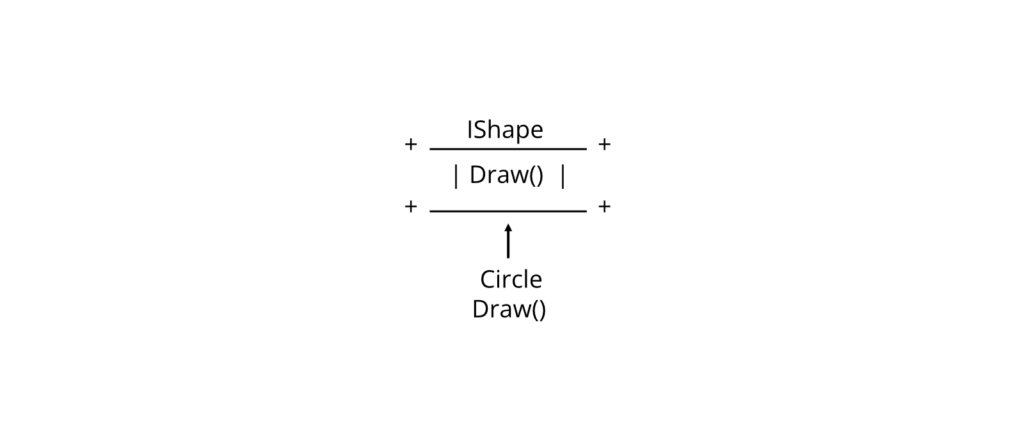
Interface vs Abstract Class
| Feature | Interface | Abstract Class |
| Object Creation | Not Allowed | Not Allowed |
| Constructors | No | Yes |
| Fields | No (except constants) | Yes |
| Multiple Inheritance | Yes | No |
| Purpose | Define a contract | Share implementation and define a contract |
Exam Note: In many university courses based on C# 7/.NET Framework, interfaces are taught as containing member declarations without implementations.
Advantages
- Supports abstraction.
- Enables multiple inheritance of behavior.
- Promotes loose coupling.
- Improves code flexibility.
- Makes applications easier to test and extend.
Limitations
- Cannot be instantiated.
- Does not store object state through instance fields.
- Requires implementing classes to provide the declared members.
Real-World Applications
Interfaces are widely used in:
- Payment gateways
- Database providers
- Printer and scanner drivers
- Logging frameworks
- Plugin architectures
Common Student Mistakes
❌ Incorrect
interface IAnimal
{
void Sound();
}
IAnimal a = new IAnimal();
Reason: Interfaces cannot be instantiated.
✔ Correct
IAnimal a = new Dog();
❌ Incorrect
class Dog : IAnimal
{
}
Reason: The Sound() method is not implemented.
✔ Correct
class Dog : IAnimal
{
public void Sound()
{
Console.WriteLine(“Dog Barks”);
}
}
Best Practices
- Use interfaces to define common behavior.
- Keep interfaces focused on a single responsibility.
- Use meaningful interface names beginning with I (e.g., IShape, IPrintable).
- Prefer interfaces when multiple unrelated classes need the same behavior.
Viva Questions
- What is an interface?
- Why are interfaces used?
- Can an interface be instantiated?
- Can a class implement multiple interfaces?
- Differentiate an interface from an abstract class.
Key Points for Exam
- An interface defines a contract.
- Interfaces are declared using the interface keyword.
- A class can implement multiple interfaces.
- Interfaces support abstraction and multiple inheritance of behavior.
- Interfaces cannot be instantiated.
📘 Examination Tip
These topics are commonly tested in semester examinations:
- MCQs (1 mark): Types of access modifiers, accessibility rules, interface characteristics, multiple interface implementation.
- Short-answer questions (5 marks): Explain private, protected, and public; define an interface with an example; compare interfaces and abstract classes.
- Long-answer questions (10 marks): Write a C# program demonstrating access modifiers and another showing multiple interface implementation with explanation and output.
- Practical/Laboratory questions: Create a class using different access modifiers and implement one or more interfaces in a C# application.
- Viva questions: Be prepared to explain encapsulation using access modifiers, the role of internal, why interfaces cannot be instantiated, and how interfaces support multiple inheritance in C#.
Enums (Enumerations)
An Enumeration (Enum) is a user-defined value type in C# that consists of a set of named integral constants.
Instead of using numeric values such as 0, 1, 2, 3, enums allow programmers to use meaningful names such as Sunday, Monday, Tuesday, making programs easier to understand and maintain.
Purpose
Enums are used to:
- Represent a fixed set of related constants.
- Improve code readability.
- Reduce programming errors caused by using magic numbers.
- Simplify decision-making in programs.
Why It Is Used
Suppose a grading system stores student grades.
Without an enum:
1 = Distinction
2 = First Division
3 = Second Division
It is difficult to remember what each number means.
Using an enum:
Distinction
FirstDivision
SecondDivision
The program becomes more readable.
Working Principle

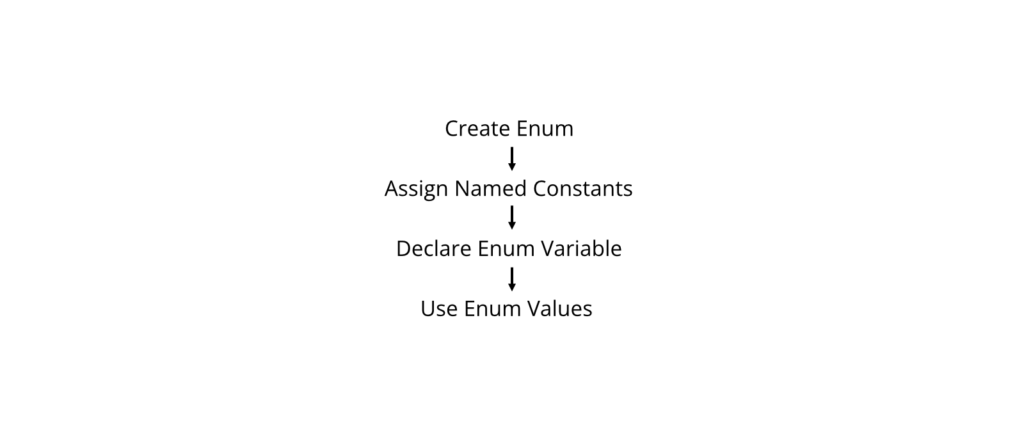
Syntax
enum EnumName
{
Constant1,
Constant2,
Constant3
}
Example 1: Simple Enum
using System;
enum Day
{
Sunday,
Monday,
Tuesday,
Wednesday,
Thursday,
Friday,
Saturday
}
class Program
{
static void Main()
{
Day today = Day.Friday;
Console.WriteLine(today);
}
}
Output
Friday
Explanation
- Day is an enumeration.
- today stores one of the enum values.
- The program prints the selected day.
Default Numeric Values
By default, enum members start from 0.
enum Month
{
January,
February,
March
}
Equivalent values are:
| Enum Member | Value |
| January | 0 |
| February | 1 |
| March | 2 |
Example 2: Custom Values
using System;
enum Status
{
Pending = 1,
Approved = 2,
Rejected = 3
}
class Program
{
static void Main()
{
Status s = Status.Approved;
Console.WriteLine(s);
Console.WriteLine((int)s);
}
}
Output
Approved
2
Explanation
- Approved has the value 2.
- (int)s converts the enum value to its integer representation.
Example 3: Enum in Switch Statement
using System;
enum TrafficSignal
{
Red,
Yellow,
Green
}
class Program
{
static void Main()
{
TrafficSignal signal = TrafficSignal.Green;
switch (signal)
{
case TrafficSignal.Red:
Console.WriteLine(“Stop”);
break;
case TrafficSignal.Yellow:
Console.WriteLine(“Wait”);
break;
case TrafficSignal.Green:
Console.WriteLine(“Go”);
break;
}
}
}
Output
Go
Memory Representation


Enum vs Constants
| Feature | Enum | Constants |
| Group Related Values | ✅ | ❌ |
| Readability | High | Medium |
| Type Safety | Better | Limited |
| Fixed Set of Values | Yes | No |
Real-World Applications
Enums are commonly used in:
- Days of the week
- Months
- Student grades
- Order status
- Payment status
- Traffic signals
- User roles
Example:
Order Status
Pending
Processing
Delivered
Cancelled
Advantages
- Improves readability.
- Eliminates magic numbers.
- Provides compile-time type safety.
- Makes switch statements cleaner.
- Easy to maintain.
Limitations
- Represents only a fixed set of values.
- Underlying values are integral types.
- Not suitable when values change dynamically.
Common Student Mistakes
❌ Incorrect
Day d = 1;
Reason: An integer cannot be assigned directly to an enum variable.
✔ Correct
Day d = (Day)1;
or
Day d = Day.Monday;
❌ Incorrect
Console.WriteLine(Day.8);
Reason: Enum members must be valid identifiers.
Best Practices
- Use enums for fixed collections of related constants.
- Give meaningful names to enum members.
- Avoid unnecessary numeric assignments unless required.
- Use enums instead of hard-coded numbers.
Viva Questions
- What is an enum?
- What is the default value of the first enum member?
- Can enum values be assigned manually?
- Why are enums preferred over numeric constants?
- How do you convert an enum to an integer?
Key Points for Exam
- Enum is declared using the enum keyword.
- Enums are value types.
- Default numbering starts from 0.
- Enum values can be explicitly assigned.
- Enums improve readability and type safety.
Generics
Generics are a C# feature that enables classes, methods, interfaces, delegates, and collections to work with different data types while maintaining compile-time type safety.
Instead of writing separate code for different data types, generics allow a single implementation that can be reused with many types.
Purpose
Generics are used to:
- Write reusable code.
- Improve type safety.
- Eliminate unnecessary type casting.
- Increase performance by reducing boxing and unboxing.
Why It Is Used
Without generics, separate classes may be required for integers, strings, or other types.
With generics:
Box<int>
Box<string>
Box<double>
The same class works with different data types.
Working Principle

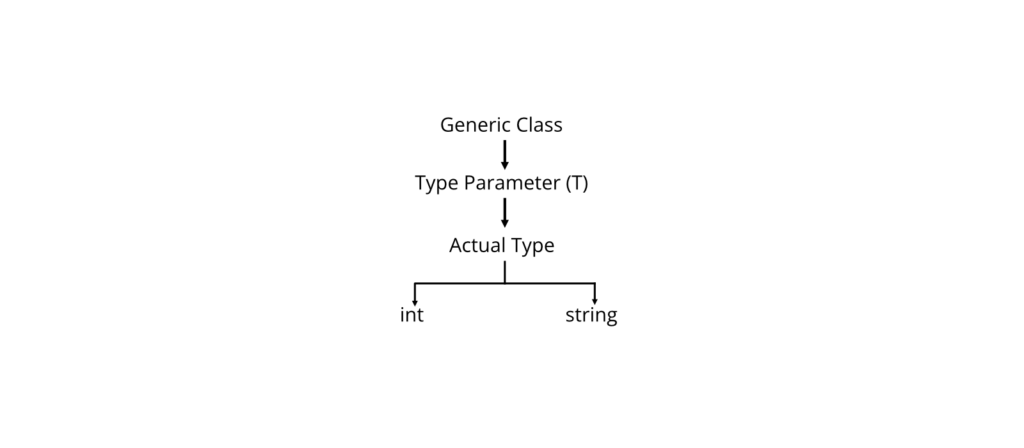
Generic Type Parameter
The most common generic type parameter is T.
Other commonly used names:
| Parameter | Meaning |
| T | Type |
| TKey | Key Type |
| TValue | Value Type |
| TResult | Result Type |
Syntax
Generic Class
class ClassName<T>
{
}
Generic Method
public void Display<T>(T value)
{
}
Example 1: Generic Class
using System;
class Box<T>
{
public T Value;
public void Show()
{
Console.WriteLine(Value);
}
}
class Program
{
static void Main()
{
Box<int> b1 = new Box<int>();
b1.Value = 100;
b1.Show();
Box<string> b2 = new Box<string>();
b2.Value = “DotNet”;
b2.Show();
}
}
Output
100
DotNet
Explanation
- Box<T> is a generic class.
- T becomes int for the first object.
- T becomes string for the second object.
Example 2: Generic Method
using System;
class Demo
{
public void Display<T>(T value)
{
Console.WriteLine(value);
}
}
class Program
{
static void Main()
{
Demo d = new Demo();
d.Display(100);
d.Display(“Hello”);
d.Display(3.14);
}
}
Output
100
Hello
3.14
Example 3: Generic Collection
using System;
using System.Collections.Generic;
class Program
{
static void Main()
{
List<string> names = new List<string>();
names.Add(“Ram”);
names.Add(“Sita”);
names.Add(“Hari”);
foreach (string name in names)
{
Console.WriteLine(name);
}
}
}
Output
Ram
Sita
Hari
Generic Class Diagram

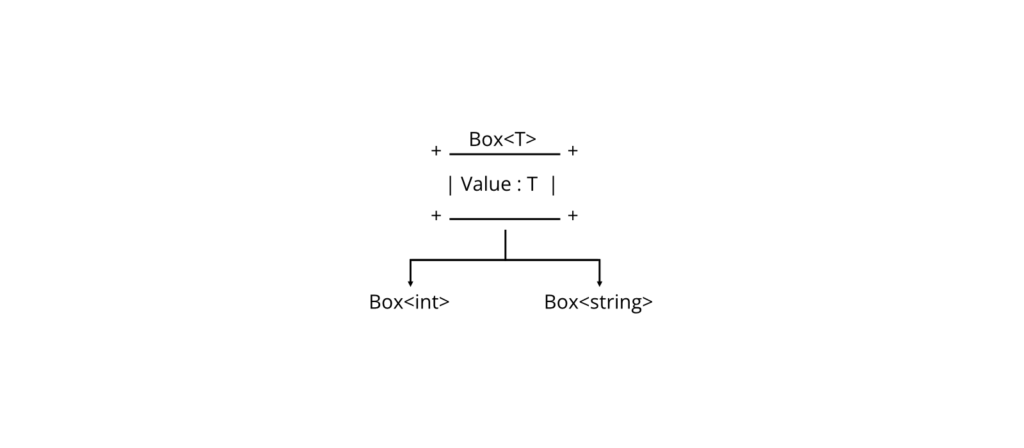
Generics vs Non-Generics
| Feature | Generics | Non-Generics |
| Type Safety | High | Low |
| Type Casting | Usually Not Required | Often Required |
| Boxing/Unboxing | Reduced | Common |
| Reusability | High | Lower |
| Performance | Better | Lower |
Real-World Applications
Generics are widely used in:
- List<T>
- Dictionary<TKey, TValue>
- Queue<T>
- Stack<T>
- Database frameworks
- Repository patterns
- Collection libraries
Advantages
- Strong compile-time type checking.
- Reusable code.
- Better performance.
- Reduced runtime errors.
- Eliminates unnecessary casting.
Limitations
- Can increase code complexity for beginners.
- Some operations require generic constraints.
- Type parameters must be used appropriately.
Common Student Mistakes
❌ Incorrect
Box box = new Box();
Reason: A generic type requires a type argument.
✔ Correct
Box<int> box = new Box<int>();
❌ Incorrect
List numbers = new List();
Reason: The generic type parameter is missing.
✔ Correct
List<int> numbers = new List<int>();
Best Practices
- Use generics instead of object whenever possible.
- Choose meaningful generic parameter names.
- Prefer generic collections (List<T>, Dictionary<TKey, TValue>) over non-generic collections.
- Avoid unnecessary casting.
Viva Questions
- What are generics?
- Why are generics used?
- What is the purpose of T?
- What are the advantages of generic collections?
- Differentiate generic and non-generic collections.
Key Points for Exam
- Generics provide type-safe reusable code.
- T represents a type parameter.
- Generic classes and methods can work with multiple data types.
- Generic collections improve performance and reduce runtime errors.
- Generics minimize boxing and unboxing.
📘 Examination Tip
These topics are frequently asked in university examinations:
- MCQs (1 mark): Default enum value, enum keyword, purpose of generics, generic type parameter T, benefits of generic collections.
- Short-answer questions (5 marks): Define enums with examples; explain generics and their advantages; compare generics and non-generics.
- Long-answer questions (10 marks): Write a C# program using enums in a switch statement and another implementing a generic class and generic method with explanation and output.
- Practical/Laboratory questions: Create an enum for application states, implement a generic Box<T> class, and use List<T> to store and display data.
- Viva questions: Be prepared to explain why enums improve readability, how enum values are assigned, why generics are preferred over object, and the benefits of type safety and reusable code provided by generics.
Important Questions
Group B (Short Questions – 5 Marks)
Classes and Constructors
- Define a class. Explain the syntax of a class with an example.
- What is a constructor? Explain its characteristics.
- Differentiate between constructors and methods.
- Explain the purpose of the this keyword.
- What is a static constructor? How is it different from an instance constructor?
- What is a finalizer? When is it executed?
- Differentiate between constructors and finalizers.
Properties and Indexers
- What is a property? Explain different types of properties.
- Differentiate between fields and properties.
- What is an indexer? Explain with a suitable example.
- Differentiate between arrays and indexers.
Static Members
- Explain static classes with an example.
- Differentiate between static and non-static classes.
- Explain the uses of static members.
Dynamic Binding
- What is dynamic binding?
- Explain compile-time binding and runtime binding.
- Differentiate between static binding and dynamic binding.
Operator Overloading
- What is operator overloading?
- State the advantages of operator overloading.
- Write the syntax for operator overloading.
Inheritance
- What is inheritance?
- Explain different types of inheritance supported in C#.
- State the advantages of inheritance.
- Differentiate between single inheritance and multiple inheritance.
- Explain the base keyword with an example.
Abstract Classes
- What is an abstract class?
- What is an abstract method?
- Differentiate between abstract class and interface.
- Why can’t an abstract class be instantiated?
Overloading
- What is method overloading?
- Explain compile-time polymorphism.
- Differentiate between method overloading and method overriding.
- Can methods be overloaded by changing only the return type? Justify your answer.
Object Type
- Explain the Object class in C#.
- What is boxing and unboxing?
- Differentiate between object and dynamic.
Structs
- What is a structure (struct)?
- Differentiate between structure and class.
- Explain value types and reference types.
- State the advantages of structs.
Access Modifiers
- What are access modifiers?
- Explain private, public, and protected.
- Differentiate between private and protected.
- What is the purpose of the internal access modifier?
Interfaces
- What is an interface?
- Explain the advantages of interfaces.
- Differentiate between interface and abstract class.
- Can a class implement multiple interfaces? Explain.
Enums
- What is an enumeration (enum)?
- State the advantages of enums.
- Explain how enum values are assigned.
Generics
- What are generics?
- Explain the advantages of generics.
- Differentiate between generic and non-generic collections.
- What is the purpose of the generic type parameter T?
Group C (Long Questions – 10 Marks)
Classes and Constructors
- Explain classes and objects in C#. Write a program to demonstrate the use of constructors.
- Explain different types of constructors with suitable C# programs.
- Explain the this keyword with suitable examples.
Properties and Indexers
- Explain properties in detail with suitable examples.
- What are indexers? Explain their working with a complete C# program.
- Differentiate between fields, properties, and indexers.
Static Members
- Explain static constructors and static classes with suitable examples.
- Compare static members and instance members with examples.
Finalizers
- Explain finalizers and garbage collection in C# with suitable examples.
Dynamic Binding
- Explain dynamic binding in C#. Write a suitable example demonstrating runtime polymorphism.
Operator Overloading
- What is operator overloading? Explain its syntax and implementation with a complete C# program.
Inheritance
- Explain inheritance in C#. Discuss its advantages and limitations with examples.
- Explain different types of inheritance supported by C# with diagrams and examples.
- Write a C# program demonstrating inheritance and the use of the base keyword.
Abstract Classes
- Explain abstract classes and abstract methods with suitable C# programs.
- Compare abstract classes and interfaces with examples.
Method Overloading
- Explain method overloading with suitable C# programs.
- Differentiate between method overloading and method overriding with examples.
Object Type
- Explain the Object class and boxing/unboxing with suitable examples.
- Discuss the importance of System.Object in C#.
Structs
- Explain structures in C#. Compare structures and classes with suitable examples.
- Write a C# program demonstrating structures and explain how they differ from classes.
Access Modifiers
- Explain all access modifiers in C# with suitable examples.
- Compare private, protected, internal, protected internal, and public.
Interfaces
- Explain interfaces in C# with suitable examples.
- Write a C# program to demonstrate multiple interface implementation.
- Compare interfaces and abstract classes.
Enums
- Explain enumerations in C# with suitable examples.
- Write a C# program demonstrating the use of enums in a switch statement.
Generics
- Explain generics in C# with suitable examples.
- Write a C# program demonstrating a generic class and a generic method.
- Compare generic and non-generic collections.
⭐ Most Important Questions (High Probability)
If you are revising just before the exam, prioritize these:
- Explain inheritance with a suitable C# program.
- Explain abstract classes and abstract methods with examples.
- Differentiate between interface and abstract class.
- Explain operator overloading with a complete program.
- Explain method overloading and compare it with method overriding.
- Explain access modifiers with examples.
- Explain structures and compare them with classes.
- Explain properties and indexers with suitable examples.
- Explain generics with a generic class and generic method.
- Explain boxing and unboxing with examples.
- Explain static constructors and static classes.
- Write a program demonstrating inheritance and the base keyword.
- Explain interfaces and implement multiple interfaces using a C# program.
- Explain enums with a suitable program.
- Explain constructors and different types of constructors.
🔥 Expected Programming Questions (Lab/Long Questions)
- Create a Student class using constructors and properties.
- Implement single inheritance using Person and Student classes.
- Demonstrate method overloading in a calculator application.
- Write a program to overload the + operator for a custom class.
- Implement an abstract class Shape with derived classes Circle and Rectangle.
- Create an interface IShape and implement it in multiple classes.
- Demonstrate the use of the base keyword.
- Create and use a struct to store employee information.
- Implement a generic Box<T> class.
- Write a program using an enum and a switch statement.